
FS25 Misc

Hired Helper Tool v 1.0

Hired Helper Tool v 1.0

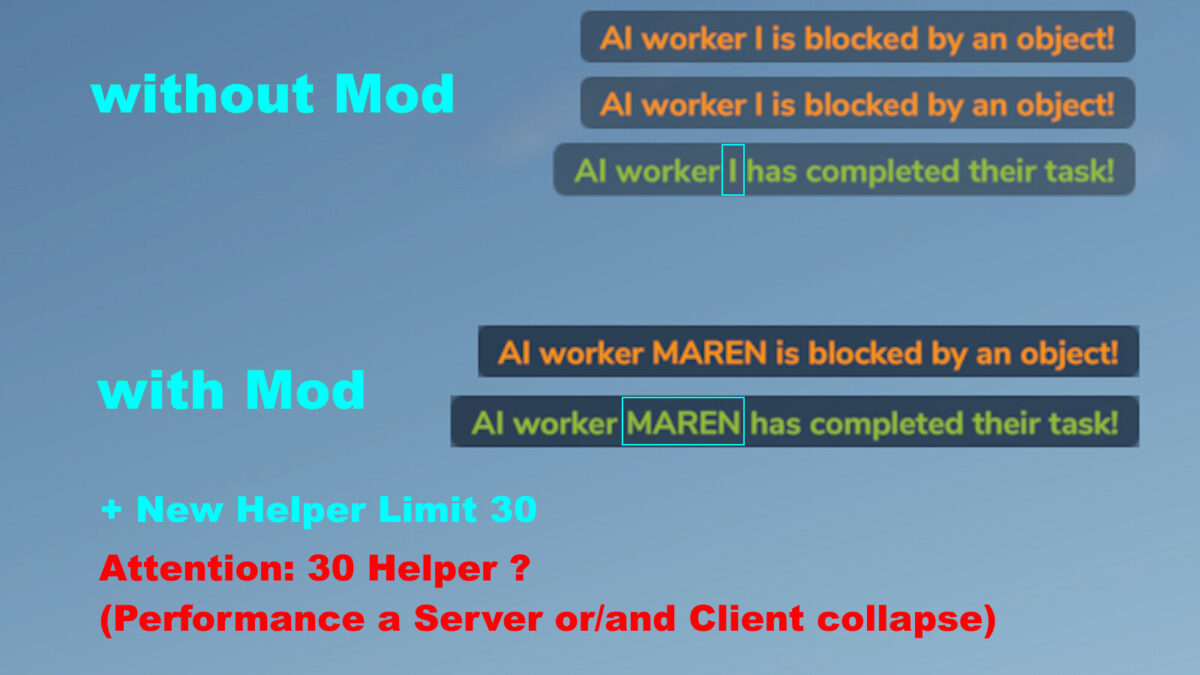
The Hired Helper Tool v1.0 for Farming Simulator 25 introduces a new way to manage hired helpers in your farming operations. This mod allows players to customize the names of hired helpers to more realistic and immersive options, giving a personal touch to your workforce. Additionally, it increases the limit for the number of hired helpers you can utilize, expanding it to a maximum of 30. This change can significantly enhance gameplay by allowing for a larger and more efficient farming operation where multiple tasks can be executed simultaneously.

– Sets realistic helper names
– Increases helper limit to 30
– Enhances gameplay efficiency
– Customization options for workforce management

Credits:

HappyLooser

How to install FS25 Misc?
Firstly find a mod which you like and want to download. Then download a mod to your PC. Mods are usually in .zip format file. But sometimes it can be in .rar. If a mod file is a .zip format no needed additional actions. If a file is in .rar, then you must unarchive mod with software like WinRar or Zip7. Windows 10 users no need to use software for archives, Win10 itself has a feature to unarchive files.
The next step is to find mods folder in your PC. Usually, it is in Documents/My Games/Farming Simulator 25/2025. Open the "mods" folder and put downloaded .zip archive or unarchived .rar file to this folder.
Last step. Enjoy of FS25 mods!

Leave a Reply

Your email address will not be published. Required fields are marked *