
FS25 Misc

Vehicles and Tools Pack v 1.1

Vehicles and Tools Pack v 1.1

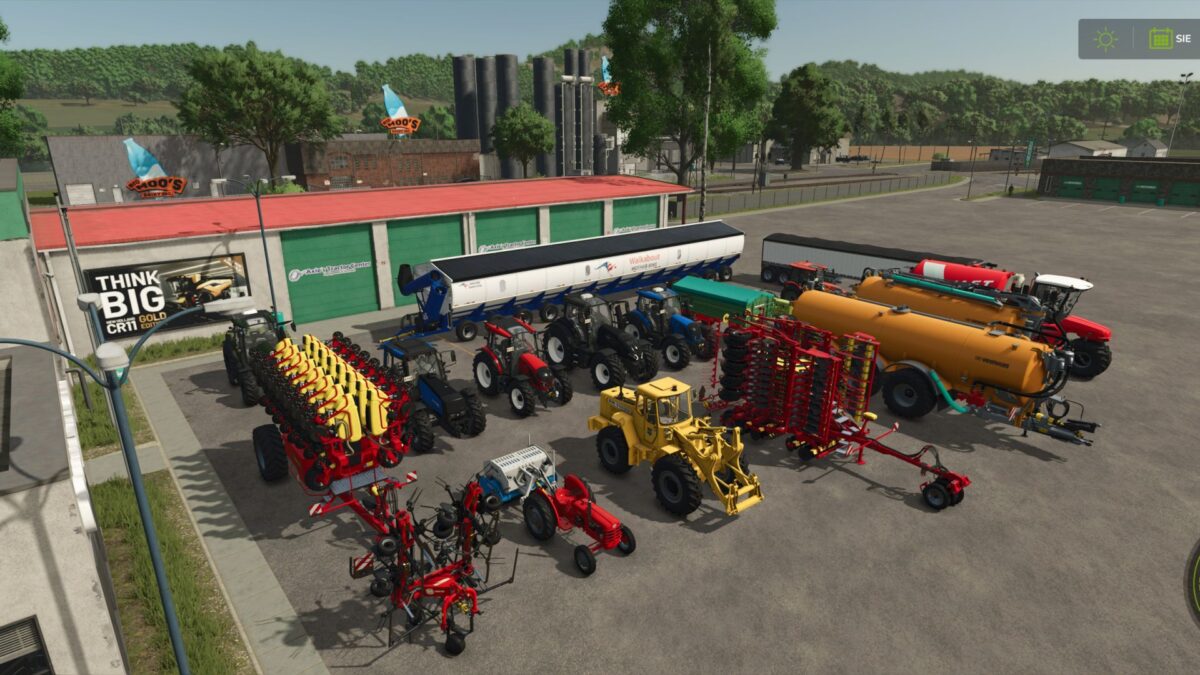
Vehicles and Tools pack from version 22 rewritten to version 25. Machines from companies starting with letters V-Z:
Vaderstad – RapidA800S, TempoL16
Valtra – Series A G N Q 8750
Veenhuis – PremiumIntegral20000, PremiumIntegral30000
Vervaet – HydroTrikeXL
Vicon – Fanex904
Volvo – Lm845, T425
Walkabout – MotherBin6000
WeberMT – Dsc180
Welger – Dk115
WilsonTrailer – Pacesetter
Zetor – MajorCL80. Z25k
Ziegler – ZanolaModules, CornChampion5R

Version 1.1:
* Fixed collisions of all vehicles
* Fixed loading triggers, refueling triggers, in case of problems get out and get into the vehicle
* Fixed color selection for vehicles

Credits:

Wrobelmen

How to install FS25 Misc?
Firstly find a mod which you like and want to download. Then download a mod to your PC. Mods are usually in .zip format file. But sometimes it can be in .rar. If a mod file is a .zip format no needed additional actions. If a file is in .rar, then you must unarchive mod with software like WinRar or Zip7. Windows 10 users no need to use software for archives, Win10 itself has a feature to unarchive files.
The next step is to find mods folder in your PC. Usually, it is in Documents/My Games/Farming Simulator 25/2025. Open the "mods" folder and put downloaded .zip archive or unarchived .rar file to this folder.
Last step. Enjoy of FS25 mods!

Leave a Reply

Your email address will not be published. Required fields are marked *