MTZ Belarus 82 Old v 1.0


MTZ Belarus 82 Old v 1.0 brings a classic to the Farming Simulator 25 experience.
With a power output of 105 hp, this versatile tractor is well-suited for various farming tasks.
The mod includes an attractive price point of 1500 in-game currency, making it accessible for players looking to diversify their fleet.
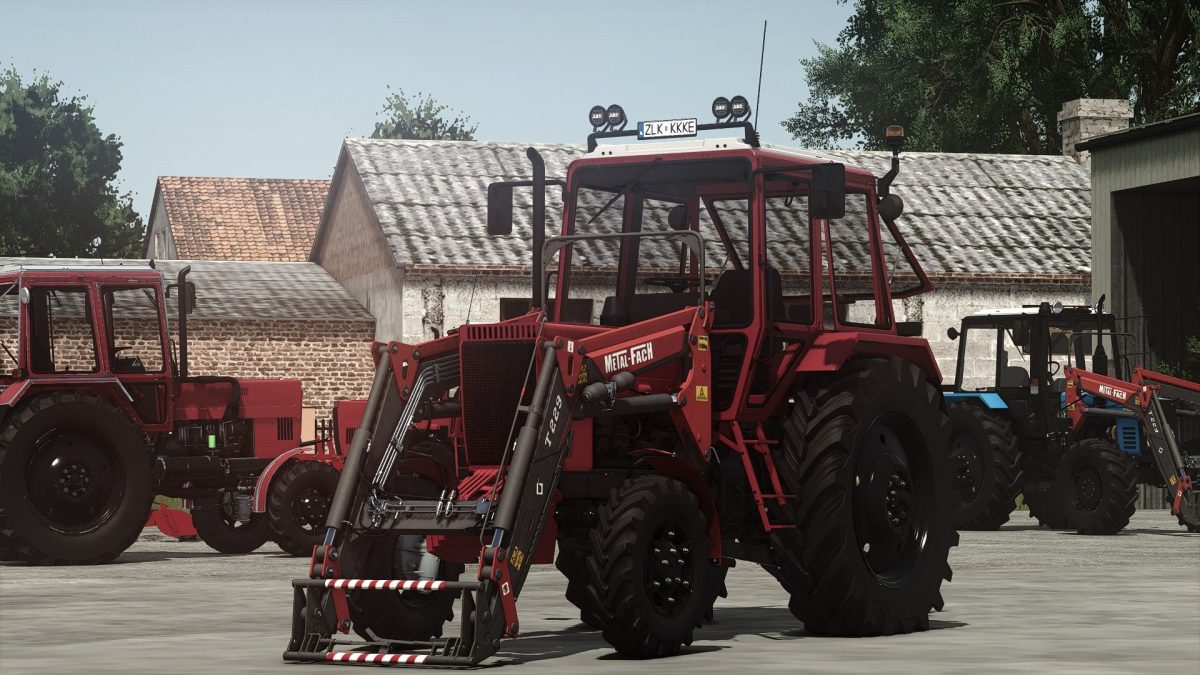
Customization options are abundant, allowing players to choose from different main color configurations along with rim colors to suit their style.
The wheels configuration provides further flexibility in adapting the tractor for specific conditions.
Additionally, players can customize the plates and incorporate a frontloader configuration to enhance functionality.
One of the standout features is the animated WounderBoum, which adds a layer of realism to the tractor’s operation.
It also comes equipped with the Metal Fach T229 frontloader, complete with an animated joystick and dynamic hoses for a more immersive experience.
– Power: 105 hp
– Price: 1500
– Main color configuration
– Rims color configuration
– Wheels configuration
– Plates configuration
– Frontloader configuration
– Animated WounderBoum
– FrontLoader for Metal Fach T229 with animated joystick and dynamic hoses
Credits:
Starlexs, BearFarm, Petya20