

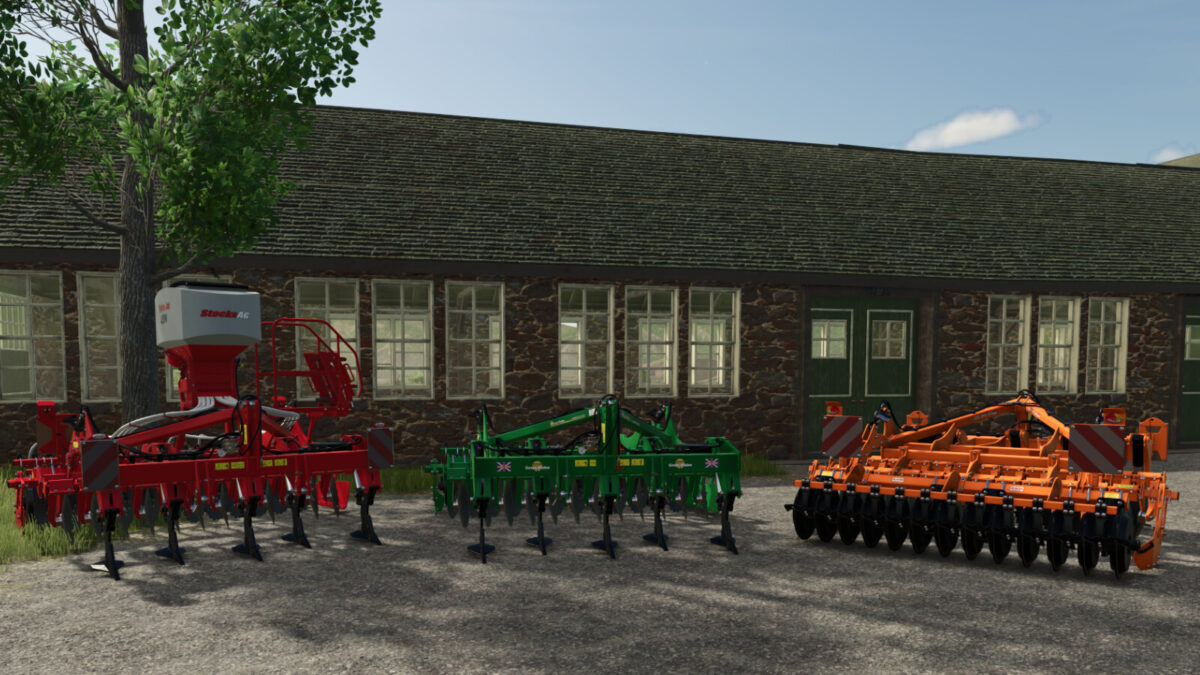
DTX 300 AR Subsoilers Pack v 1.0


Designed as a mounted one-pass stubble incorporator/soil loosener for tractors in the 200-350hp range, the DTX is extremely versatile. It can be used for first entry with non-inversion tillage or to knock down ploughing whilst loosening down to 40cm.
It is also ideally suited to establish grass, canola or cover crops straight into stubble as one pass operation in combination with the a-drill as it leaves a very levelled, fine and consolidated seedbed.
This mod was originally part of the FS22 basegame as a Kverneland branded tool with a configurable seedbox.
This pack contains the following:
– Great Plains DTX300AR
– Kverneland DTX300AR
Both brand variants have the following configurations:
– Standard (no Covering Harrow or Seedbox)
– Covering Harrow
– Seedbox: StocksAG TJ Wizard
– Seedbox: StocksAG TJ iCon
Additionally, Lights and Warning Signs can be optionally added or removed.
The Great Plains brand variant has two colour options:
– Great Plains Green
– Great Plains Orange
Category: Subsoilers
Required power: 200 HP
Working Width: 3m
Working speed: 12 kph
Base Price: £29,000
Credits:
CRS Design


