FS25 Misc

Wooden Deck Railing Section v 1.0

Wooden Deck Railing Section v 1.0

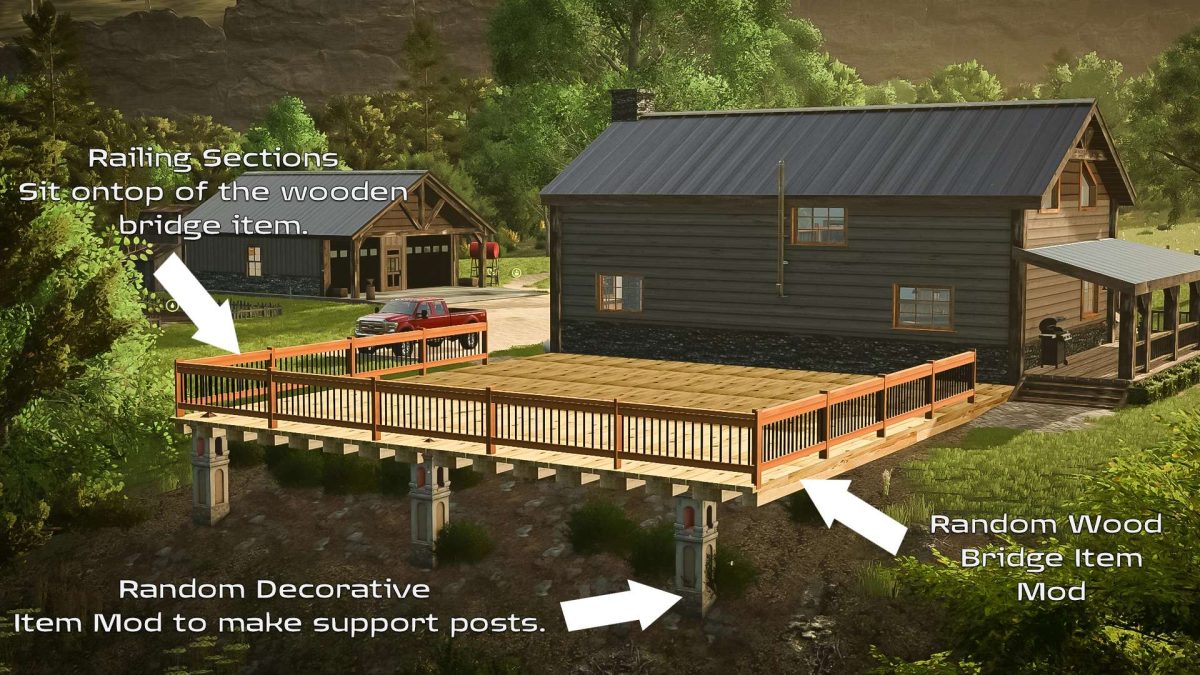
Are you tired of friends and family having a little too much and falling off your DIY deck in FS25? No longer do you need to experience this.
This simple mod is a section of wooden deck railing with black metallic spindles to give your DIY deck project a beautiful and safe finishing touch.
Drag and drop into your mod folder for FS25 and then you will find this mod (It’s $0 by the way) in the OTHER in the map editor menu (The one with the light).

Remember: This railing will “sit” on-top of any existing structure. You will need to make sure you are in “FREE Placement Mode” in the map editor. Duplicate as needed to complete your deck project.

Credits:

withthestovers

How to install FS25 Misc?
Firstly find a mod which you like and want to download. Then download a mod to your PC. Mods are usually in .zip format file. But sometimes it can be in .rar. If a mod file is a .zip format no needed additional actions. If a file is in .rar, then you must unarchive mod with software like WinRar or Zip7. Windows 10 users no need to use software for archives, Win10 itself has a feature to unarchive files.
The next step is to find mods folder in your PC. Usually, it is in Documents/My Games/Farming Simulator 25/2025. Open the "mods" folder and put downloaded .zip archive or unarchived .rar file to this folder.
Last step. Enjoy of FS25 mods!

Leave a Reply

Your email address will not be published. Required fields are marked *