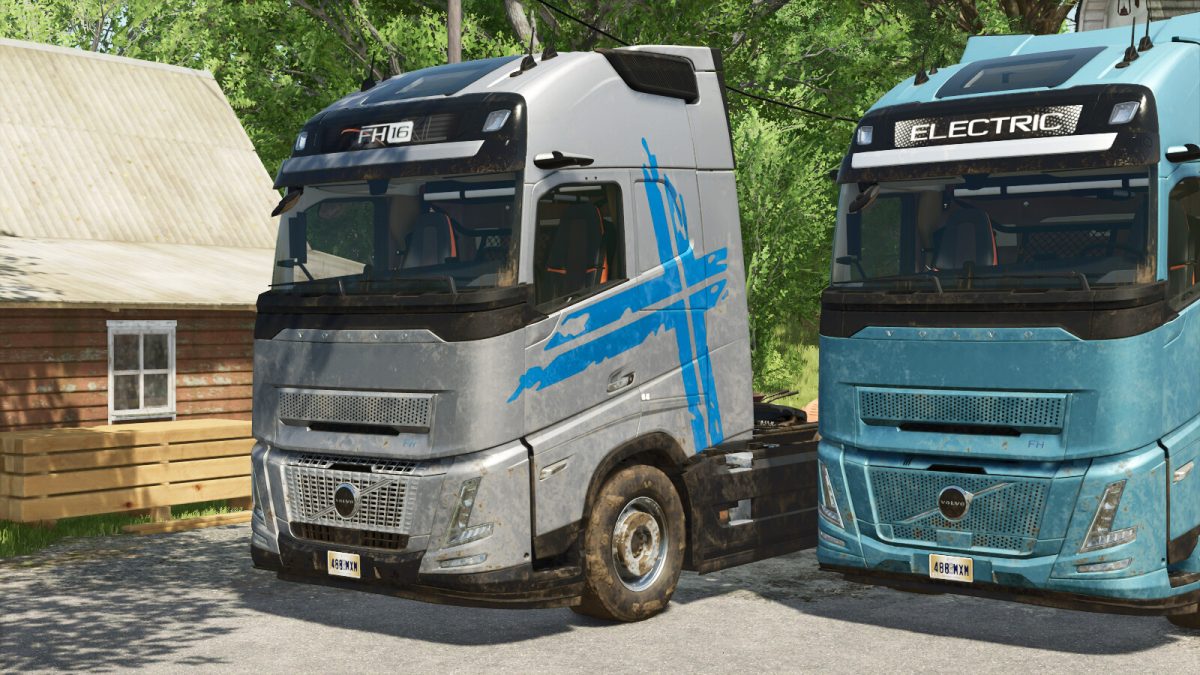
Volvo FH16 v 1.0


Massive modifications based on the vanilla fh16. A few issues with its model and texture have been fixed.
Major features:
– Added brand new self-made body parts including Aero front grill. Functional Camera Monitor Systems, actually a mirror though.
– More body part and color configurations. Optimized the materials of some body parts. Add LOD for fhElectric and new body parts.
– Realistic rear-wheel drive. Suspension motion on all axles. Optimized cab suspension. Significant adjustments to lighting and motor.
– Trigger sounds when getting on or off the vehicle. Automatically fasten seat belt on driver seat, fasten seat belt of passenger seat using Interactive Control however.
– There are some movable parts inside and outside the vehicle that are controlled by Interactive Control. Monitor in the cab could switch to mini map screens manually if you have installed Real GPS Mod. And of course you could skip the night in the sleeper if you have installed Vehicle Sleeper Cab.
Mod support:
Interactive Control
Vehicle Sleeper Cab
Real GPS Mod
Note: This mod includes diesel and electric 4×2 semi truck only. More chassis are being redesigned.
FH16 2Axle
– Category: Trucks
– Price: 137,000 $
– Power: 600 HP
– A great many of configurations
FH Electric 2Axle
– Category: Trucks
– Preis: 145,000 $
– Power: 450 HP
– A great many of configurations
Credits:
HatsuneKid