Vehicle Systems v 1.0


Vehicle Systems adds a lightweight vehicle maintenance layer to make machines feel more alive without becoming overly complicated. The mod tracks several vehicle systems and displays their condition through a compact in-game HUD.
Included systems:
Oil System
Oil condition slowly wears down through use. As oil condition gets worse, the vehicle can begin showing warnings and reduced reliability. If ignored for too long, the vehicle may reach a critical oil state and require service before it is considered healthy again.
Fuel Filter System
The fuel filter wears over time while the vehicle is running. A dirty or restricted fuel filter can cause performance-related warnings and make the vehicle feel less dependable. If the filter becomes critically restricted, the vehicle needs service to restore proper fuel system condition.
Brake System
Brake condition wears during vehicle operation and braking. When the brakes become worn, the HUD will warn the player. If the brakes become critically worn, the vehicle is flagged as needing brake service and the warning state becomes more severe.
Battery System
The battery tracks condition/charge so vehicles have a basic electrical maintenance requirement. A weak or low battery can trigger warnings on the HUD and may require battery service or replacement when it becomes too low.
HUD and Warnings
The compact HUD shows the current vehicle’s system status. System values use warning colors so players can quickly see when something is worn or critical. The HUD can be repositioned through the controls menu keybind, and movement/camera input is locked while repositioning the HUD to prevent unwanted vehicle movement.
Workshop Service Integration
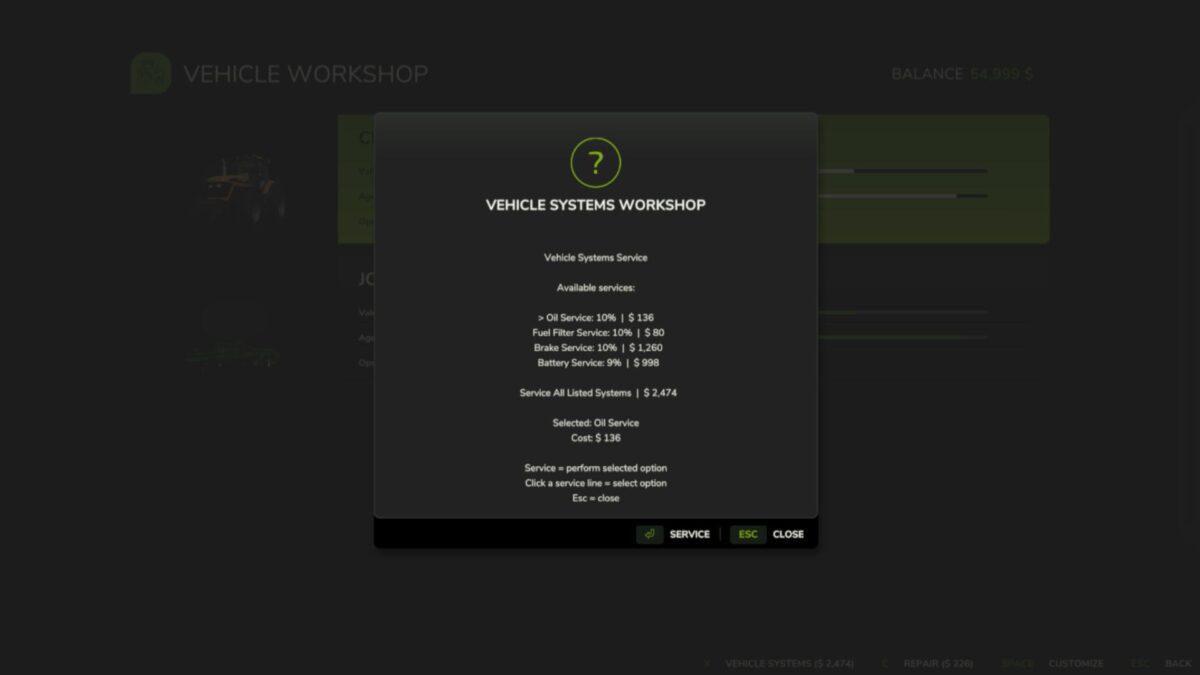
Vehicle servicing is integrated into the workshop/garage flow. Players can service individual systems or use a service-all option when multiple systems need attention. The workshop menu automatically adjusts to the systems currently needing service.
Credits:
plutogaming91