

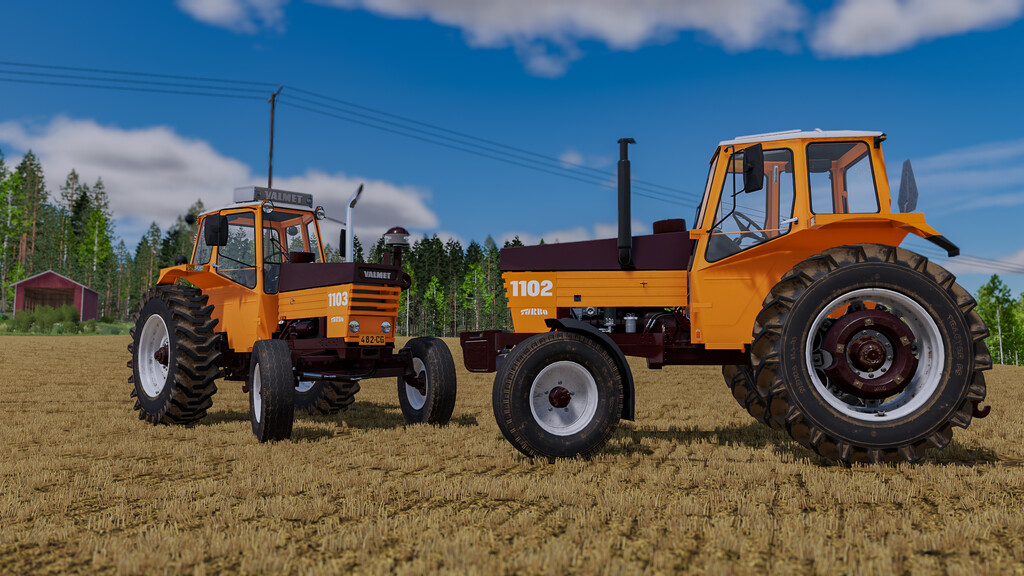
Valtra Valmet 1102/1103 v 1.0


In 1979 Valmet 1102 was updated with new bright yellow color scheme and small increase in power. Its parallel model 1103 had Hi-Trac reducing powershift gear and quick coupling 3-point hitch hooks. They were in production until 1980 when they were replaced by Valmet 1203.
Specs:
Store category: small tractors
2WD and 4WD models
Power: 107 hp & 130 hp (tuned)
Gears: 8 + 2 – 1102
Gears: 16 + 4 (with Hi-Trac reducing powershift) – 1103
Speed: 32 km/h
Base price:
2WD: 15500 $ (24000 $ with J81 frontloader)
4WD: 20500 $ (29000 $ with J81 frontloader)
Model 1103 is 3500 $ more expensive
Configurations:
– Air pre-filters
– Fresh air blower
– Work lights
– Front fenders
– Beaconlight
– Export options: Default (Finland) + Sweden & Norway
– Wheel weights
– Pressure air kit (visual only)
Openable doors, windows and hood with mouse control or Interactive Control mod on PC.
Credits:
AEN Design


