

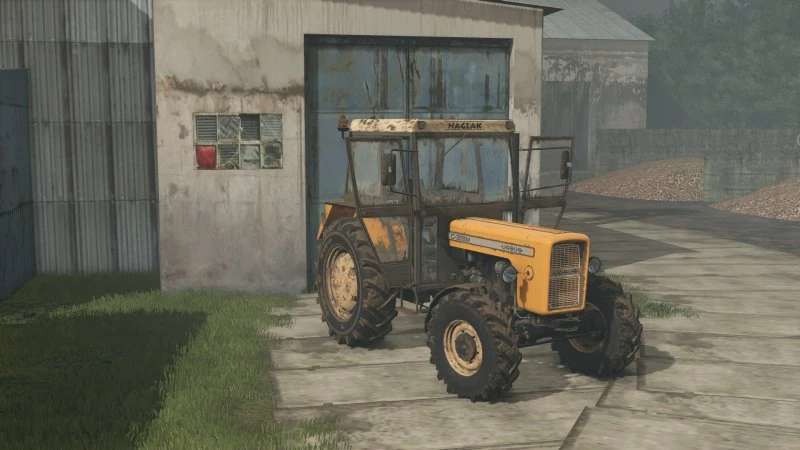
Ursus C360 4×4 Turbo v 1.0


The Ursus C360 4×4 Turbo v 1.0 is a compact yet powerful tractor designed for various farming tasks. With a price of €18,000 and an engine output of 52 HP, it falls under the small tractors category, making it an ideal choice for smaller farms or as an addition to a larger fleet.
This mod features an entirely new tractor model along with a revamped wheel design, enhancing the overall appearance and realism. The introduction of new specular and normal maps contributes to a more detailed texture finish. The cabin has been significantly improved, with three new cabin options available to suit different preferences and farming needs.
The T261 turret can be attached separately, expanding its functionality. Additionally, various new wheels and weight configurations are included, along with a configurable front weight option. For those using IC mod, an IC panel has been integrated for better control and customization.
In terms of aesthetics, several new color options have been added, allowing players to personalize their tractor to their liking. Furthermore, the tractor’s power and weight balance have been improved, and the clock backlight has been enhanced for better visibility.
– New tractor model
– New wheel model
– New Specular
– New normal map
– Improved cabin models + 3 new cabins
– Separately attached T261 turret
– New Tur and accessories from Ursus
– Added new wheel and weight configurations
– Configurable front weight
– Added IC panel (a simple IC mod is needed for this)
– Added several new colors
– Improved tractor power and weight
– Improved clock backlight
Credits:
Driver300, Puszkap, Pietruu


