

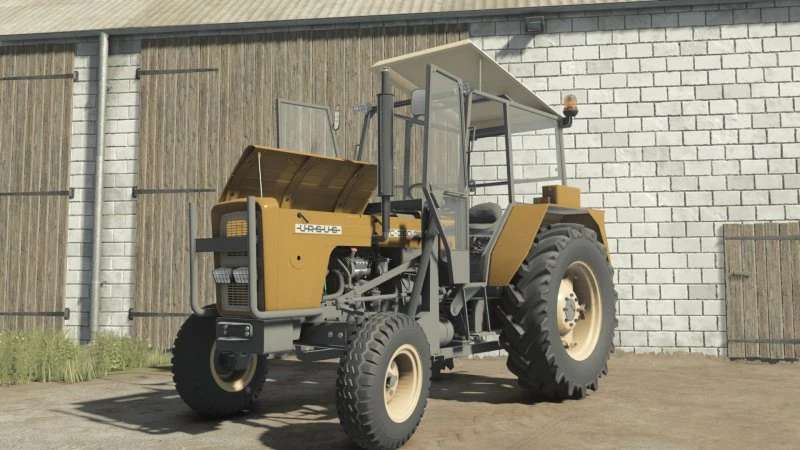
Ursus C355-360 Pack v 2.0.1.1


Ursus C-series
Price: 18,000
Power: 45–52 [Hp] Version: C355 [4×2/4×4], C355M [4×2/4×4], C360 [4×2/4×4], C360-3P [4×2/4×4] Category: small tractors
Real sounds
Configurations:
Cab
Engine
Reflectors
Rear mudguards
Front splashbacks
Type of tail lamps
Type of front lamps
Type of searchlight
Seat configuration
Type of steering wheel
Wheel attachments
Knob on steering wheel
Stickers
Weights
Silencer type
Compressor type
Oil filter type
Loading type
Air filter type
Front axle type
Bonnet type [Removed|Installed] Fenders
Type of grills
Fender box
Cables on Lights
Additions on rear short flaps
Warning lights
Additional lighting
Type of supplementary lighting
Rear attachments
Registration plate
Colors
Front loaders:
Tur T-261 V1
Tur T-261 V2
Bale forks
Pallet forks
Manure forks
Shovel
Rear weight
Version 2.0.1.1
* Compatibility with Intercative Control
* Opening doors
* Removing doors
* Opening the roof
* Opening the mask
* Launching the tractor
* Removing the front bolt
Credits:
Driver300, Gracjan26, Prezes, Orzech (habett34), ZlotowkaScammer, Miziuu EDIT (WypisanY


