

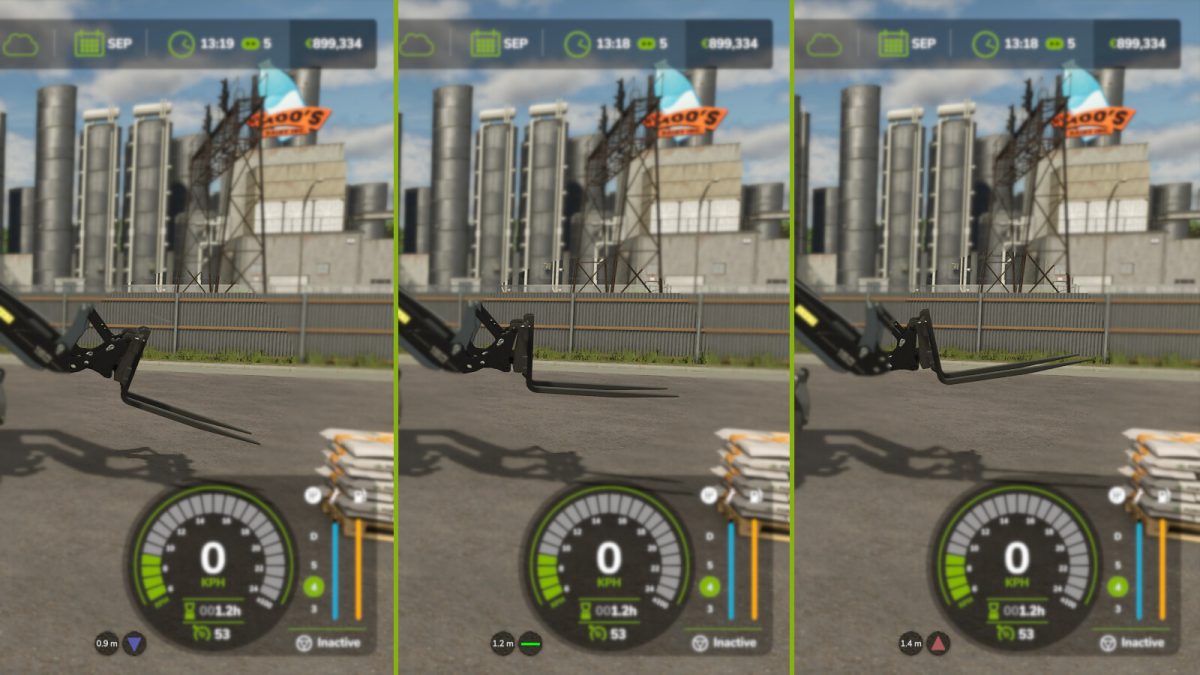
Tool Inclination Helper v 1.0.0.6


This mod displays whether or not your forks (or other implements) are level (= horizontal orientation) or not.
Additionally, it displays the distance of the tool to the ground or to whatever is below it (bales, pallets, trailer, …).
You can choose between icons or degrees in the settings, you can turn on or off color coding if set to “degrees”, and you can move the display around, if needed.
The mod works for at least any base game front loader tool, wheel loader tool, telehandler tool, skid steer tool and forklift.
Note that the default “level” orientation and distance to ground depend on how the tool was designed.
If you want to change the default orientation and/or distance to ground, you can move the tool to the desired position and orientation and press [Ctrl] [Shift] [R] to treat the current position to 0° and 0m from ground. The display will then start showing the difference to this position/orientation.
Hotkeys:
– [Ctrl] [Shift] [R]: Stores the current position and orientation as a reference
Version 1.0.0.6:
* Fixed an issue where warnings would appear in the log when using vehicles with multiple implements
Credits:
Farmsim Tim (timmeey86)


