
FS25 Mowers

Skid Steer Mower v 1.0

Skid Steer Mower v 1.0

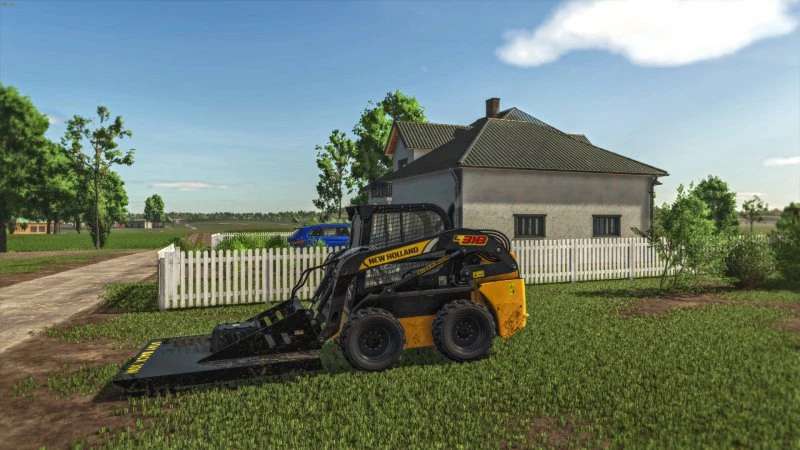
The Skid Steer Mower v 1.0 is designed to enhance your farming experience by providing a robust solution for lawn maintenance. With a price tag of 3000, this mod transforms a traditional lawn mower into an efficient lawn mulcher, ensuring grass clippings are finely mulched instead of being thrown about. This functionality is particularly useful for maintaining neat and tidy grounds without the hassle of dealing with grass piles. Ideal for farms looking to maintain their lawns effectively, this mower offers practicality and efficiency in one compact package.

– Converted lawn mower to mulching functionality
– Does not throw grass clippings
– Price: 3000
– Compatible with skid steer loaders
– Enhances lawn maintenance on farms

Credits:

Back Country Farmer

How to install FS25 Mowers?
Firstly find a mod which you like and want to download. Then download a mod to your PC. Mods are usually in .zip format file. But sometimes it can be in .rar. If a mod file is a .zip format no needed additional actions. If a file is in .rar, then you must unarchive mod with software like WinRar or Zip7. Windows 10 users no need to use software for archives, Win10 itself has a feature to unarchive files.
The next step is to find mods folder in your PC. Usually, it is in Documents/My Games/Farming Simulator 25/2025. Open the "mods" folder and put downloaded .zip archive or unarchived .rar file to this folder.
Last step. Enjoy of FS25 mods!

Leave a Reply

Your email address will not be published. Required fields are marked *