
FS25 Misc

Sell Land anyway v 1.0

Sell Land anyway v 1.0

Lets you sell farmland even when placeables are on it.
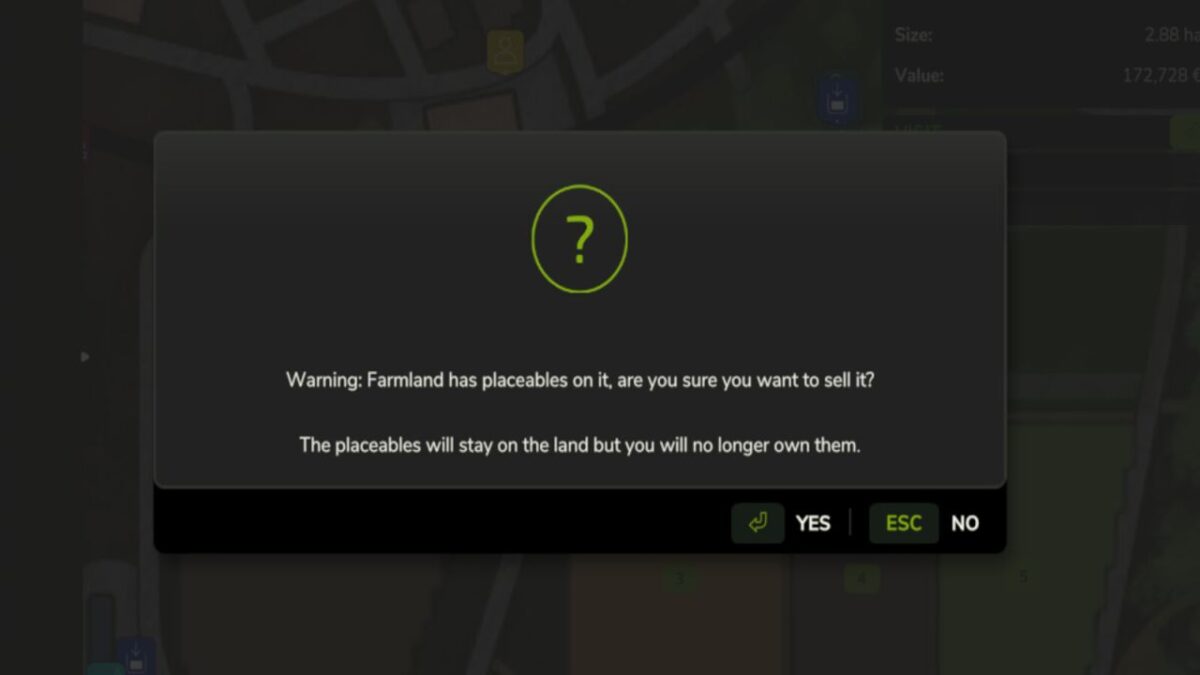
When you click Sell on a farmland with placeables, instead of the dead-end “cannot sell” message you get a Yes/No dialog:
“Warning: Farmland has placeables on it, are you sure you want to sell it?”

Click Yes and the sale goes through. The placeables stay where they are but ownership transfers to the spectator farm – you no longer own them, get income from them, or pay upkeep on them.
You receive the normal sell price for the land. Placeables on the abandoned land are forfeit without compensation.

Console fallback:
sellLand sells the farmland you are standing on
sellLand 12 sells farmland id 12
sellLandAll sells every farmland you own

Singleplayer or master user in multiplayer.

Credits:

Owen

How to install FS25 Misc?
Firstly find a mod which you like and want to download. Then download a mod to your PC. Mods are usually in .zip format file. But sometimes it can be in .rar. If a mod file is a .zip format no needed additional actions. If a file is in .rar, then you must unarchive mod with software like WinRar or Zip7. Windows 10 users no need to use software for archives, Win10 itself has a feature to unarchive files.
The next step is to find mods folder in your PC. Usually, it is in Documents/My Games/Farming Simulator 25/2025. Open the "mods" folder and put downloaded .zip archive or unarchived .rar file to this folder.
Last step. Enjoy of FS25 mods!

Leave a Reply

Your email address will not be published. Required fields are marked *