

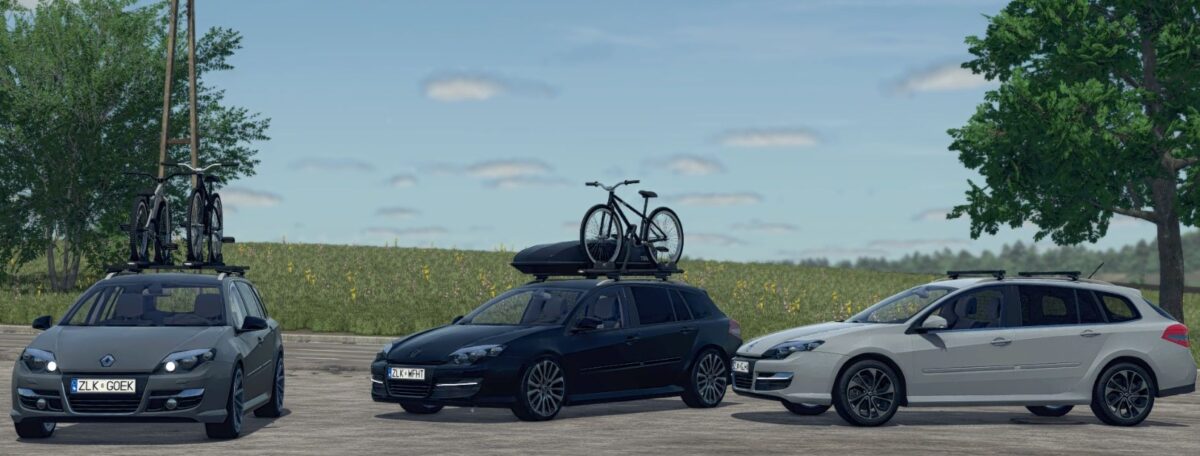
Renault Laguna III ph.2 Grandtour v 1.2


24 different rims (Continental and Michelin tyres)
8 different engines (1.5 dCi manual and different 2.0 dCi manual and automatic)
16 different shiny colors
15 different configurations:
3 different exhausts
5 different suspensions
Wheel spacers (without/with)
4 windows colors
Windows sunshades (without/with)
Rear lights (default/GT Line)
Front bumper type (2011 – 2013/2013 – 2016)
Front lights (halogen/bi-xenon)
Mirror turnlights (default/black)
4 different comfort equipment package
3 different media systems
3 different roof antennes
Roof color (Default/Black)
4 different roof accessories
3 different tow hitches
Tension belts selection for roof top rack
Version 1.2:
* Fixed all color materials (car and rims with tyres)
* Fixed roof accessories (tension belts)
* Fixed front bumper (2013 – 2016)
* Added details color configuration (chrome and chrome delete)
* Added rear plate number lights
* Added decoration parking sensors configuration (without, rear and rear + front)
Credits:
Simmi96


