

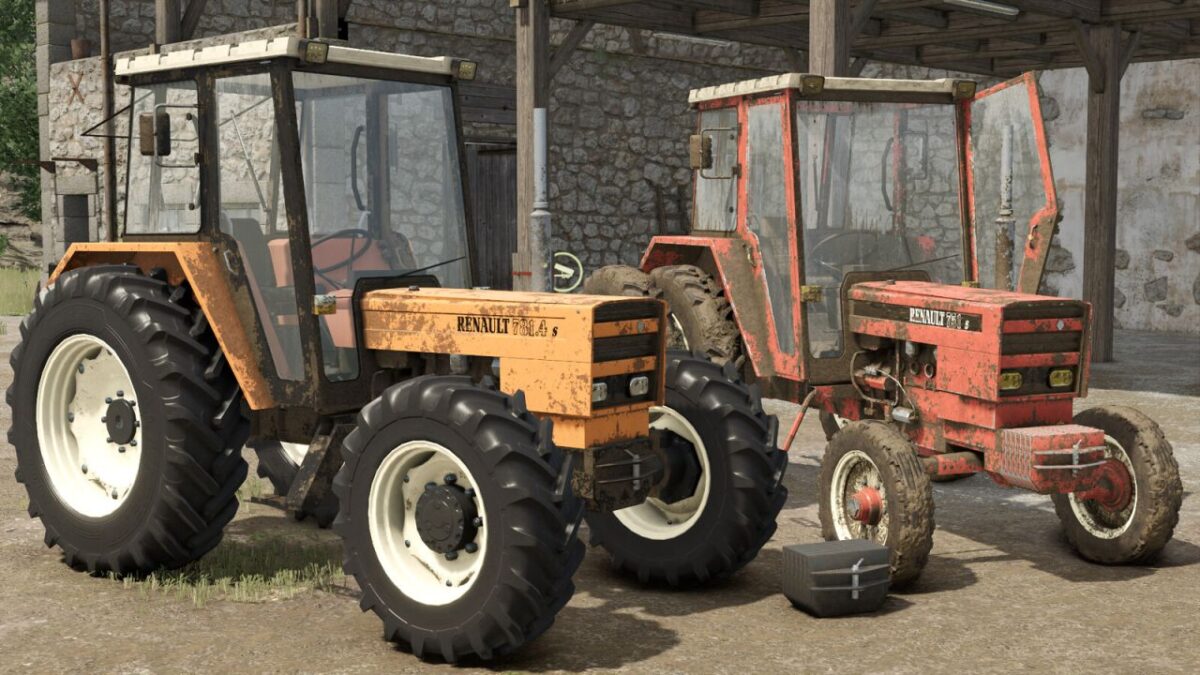
Renault 7X1s & 7X1-4s Pack v 2.0


Discover the legendary Renault 7X1s along with its 4-wheel drive version, the 7X1-4s, two iconic tractors that marked an entire generation of French farmers. True symbols of 70s and 80s farms, these Renault tractors return today in a mod created with passion, attention to detail, and respect for authenticity.
Between nostalgia, mechanical simplicity, and unique character, this pack immerses you in the atmosphere of classic French farming. Whether you are a fan of vintage machinery, passionate about Renault Agriculture, or simply looking for an authentic tractor for your farm, this mod is made for you.
Considered one of the most anticipated French mods by the Farming Simulator community, this pack was designed to provide maximum immersion while preserving the soul of the real Renault 7X1s.
Included in this pack:
Renault 7X1s (2-wheel drive)
Renault 7X1-4s (4-wheel drive)
Front weight adapted for both tractors
Configurations available on both tractors:
Multiple tire setups
Engine configurations (75 HP or 78 HP)
Mirror options (left only or both)
Multiple beacon positions
Old or modern beacon styles
Exhaust smoke effects (black smoke or white/normal)
Body color selection
Rim color selection
Renault 7X1s:
Price: 14,900$
Power: 75 – 78 HP
Maximum speed: 27 km/h
Renault 7X1-4s:
Price: 15,100$
Power: 75 – 78 HP
Maximum speed: 27 km/h
Weight:
Price: 280$
Weight: 500 kg
Version 2.0:
* Fixed rear three point hitch.
* Fixed engine configuration names.
* Fixed incorrect maximum speed displayed in the store.
* Fixed exhaust smoke particle position.
* Fixed rear window Interactive Control trigger.
* Fixed narrow tire configurations for all brands on the Renault 7X1-4s.
* Improved front loader attachment visuals.
* Replaced wheel rims with star style rims for improved realism.
* Reworked tire configurations.
* Added front weight color configuration.
* Added interior color configuration.
* Added headlight configuration (LED / Halogen).
* Added red color configuration.
Credits:
Kaymara, ToitoineModding, X3D


