
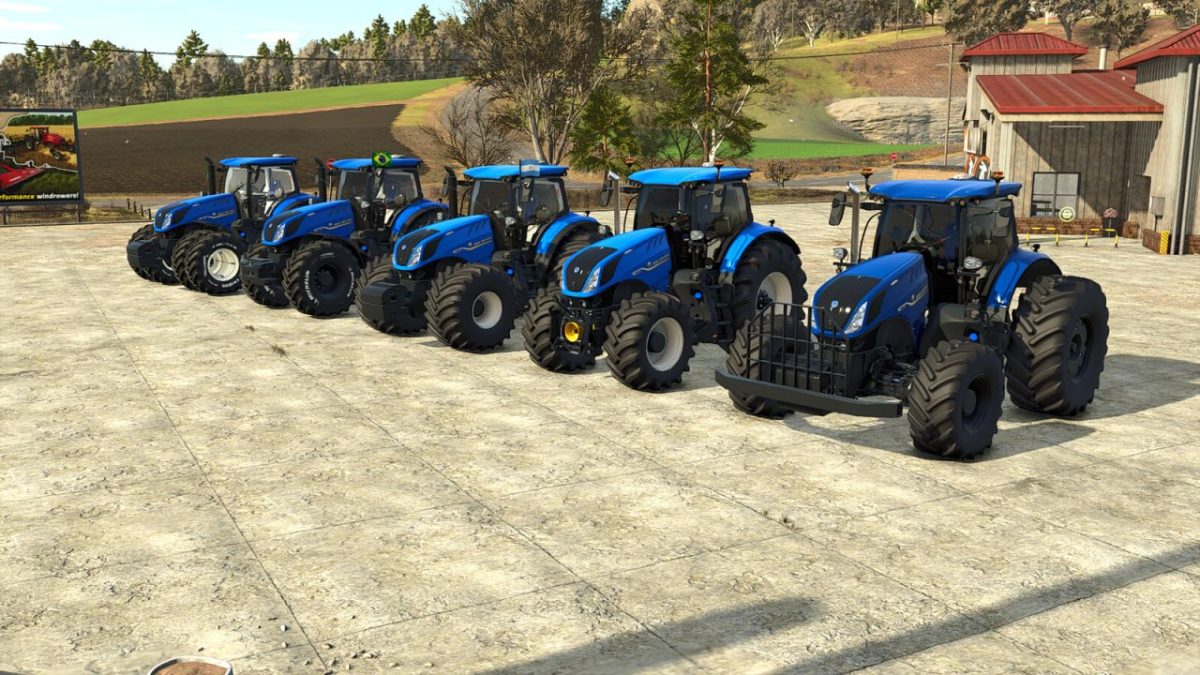
FS25 New Holland Tractors

New Holland T7 HD Edition v 1.0

New Holland T7 HD Edition v 1.0

The New Holland T7 HD Series Edition is a versatile field tractor that is easy to handle and offers multiple configurations.

– Price: 190,500 $
– Power: 275, 290, 315 hp
– Category: Medium Tractors
– Tank capacity: 630L
– Transmission: Variable CVT
– Weight: 10.9 tons
– Maximum speed: 50 km/h
– Wheels: standard tires, wide tires, dual tires, open-gauge tubular tires, and Lizard rice tires.
– Animations: Throttle, Joystick, PowerShuttle.
– Controllable animations: door and hood.
– Configurations: fenders, wheels, emergency lights, windows, weights and cane guards, wheel counterweights, exhausts, engine, front loader, and radio antenna.
– Colors: base, seat color, wheel color.
– Optional reverse sound
– Wheels with white lettering

Credits:

Frits

How to install FS25 New Holland Tractors?
Firstly find a mod which you like and want to download. Then download a mod to your PC. Mods are usually in .zip format file. But sometimes it can be in .rar. If a mod file is a .zip format no needed additional actions. If a file is in .rar, then you must unarchive mod with software like WinRar or Zip7. Windows 10 users no need to use software for archives, Win10 itself has a feature to unarchive files.
The next step is to find mods folder in your PC. Usually, it is in Documents/My Games/Farming Simulator 25/2025. Open the "mods" folder and put downloaded .zip archive or unarchived .rar file to this folder.
Last step. Enjoy of FS25 mods!

Leave a Reply

Your email address will not be published. Required fields are marked *