

Liquid Storage and Transport Pack v 1.0


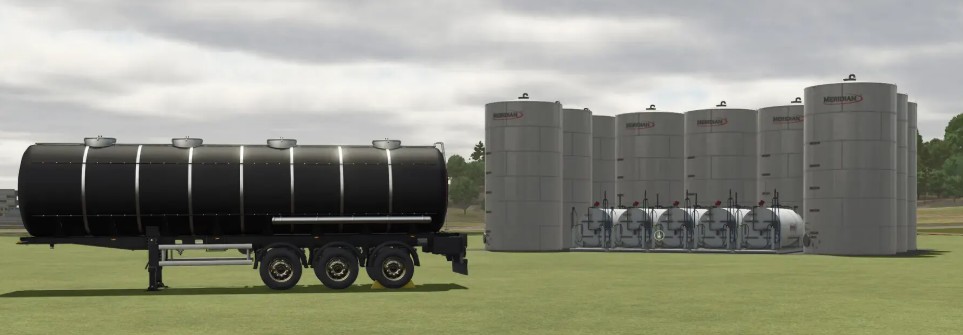
The Liquid Storage and Transport Pack v 1.0 for Farming Simulator 25 enhances your farming operations by providing essential tools for managing and transporting various liquids. This mod pack features three liquid storage tanks of varying capacities, catering to the needs of different farm sizes. The tanks can hold 500,000L, 1,000,000L, and a substantial 5,000,000L, allowing for efficient storage solutions.
In addition to the storage tanks, the pack includes two types of transport trailers specifically designed for liquid transport. The trailers, modified from the MKS series (MKS8 and MKS32), come in multiple color options and capacities, giving you versatility in how you manage your liquid resources.
The small liquid storage option is priced at €25,000 with a daily maintenance cost of €25, while the medium storage tank costs €50,000 with €50 maintenance. The large storage tank, suitable for extensive operations, is priced at €125,000 and incurs a maintenance cost of €125 per day.
For transport, the MKS8 trailer provides options for 8,000L, 15,000L, and 25,000L capacities at a price of €25,000.
Small liquid storage:
– Price: €25,000
– Capacity: 500,000 L
– Maintenance: €25 / day
Medium liquid storage:
– Price: €50,000
– Capacity: 1,000,000 L
– Maintenance: €50 / day
Large liquid storage:
– Price: €125,000
– Capacity: 5,000,000 L
– Maintenance: €125 / day
Liquid trailer MKS8:
– Price: €25,000
– Capacities: 8,000 L, 15,000 L, 25,000 L
– Category: Barrels
Liquid trailer MKS32:
– Price: €90,000
– Capacities: 32,000 L, 50,000 L, 80,000 L
– Category: Barrels
Credits:
PBSMods


