

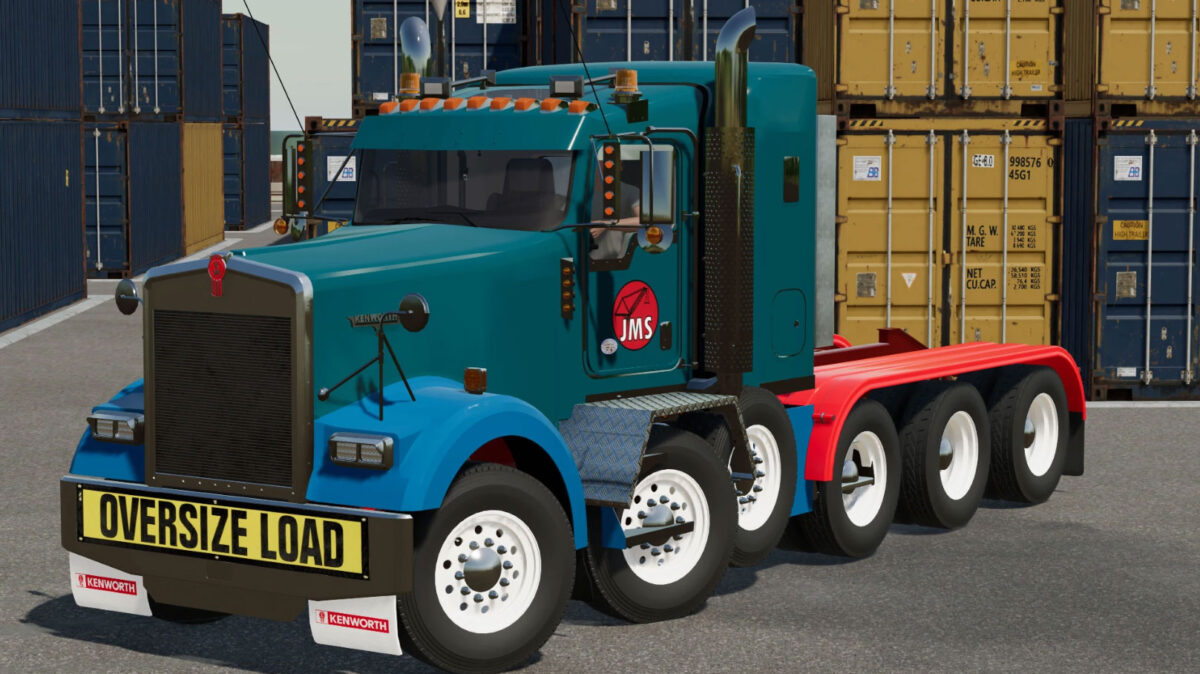
Kenworth T800/W900 v 1.0


– Engine Setup: 430 hp, 450 hp, 470 hp, 500 hp, 565 hp, 605 hp, 800 hp
– Speed 80 km/h
– Selectable Wheels
– Selectable Wheels Brand
– Selectable Chassis Length
– Selectable Front Frame Tanks/Boxes
– Selectable Rear Frame Tanks/Boxes
– Selectable Hood
– Selectable Air Cleaners
– Selectable Grill Bars
– Selectable Cab
– Selectable Beacons
– Selectable Attachers
– Selectable Roof Lights
– Selectable Rear Fenders
– Selectable Exhausts
– Selectable Bumpers
– Selectable Headlights
– Selectable Roof
– Selectable Sleeper Fairing
– Selectable Fifth Wheel Ramps
– Selectable Mid Frame Accessories
– Selectable Bumper Accessories
– Selectable Air Cleaner Accessories
– Selectable Steering Wheel
– Selectable Sun Visor
– Selectable Bugshield
– Selectable Racks
– Selectable Sidelights
– Selectable Mirror Lights
– Selectable Mirror Lolipop Lights
– Selectable Kick Plate Options
– Selectable Antennas
– Selectable Window Tint
– Selectable Rear Cab Lights
– Selectable Hood Mirrors
– Selectable Bumper Guides
– Selectable Kenworth Logo
– Selectable Company Logo
– Selectable Headlight Chrome Trim
– Selectable Window Chrome Trim
– Selectable Front Toolbox Step Flaps
– Selectable Heavy Haul Banner
– Selectable Lift Axles
– Selectable Lift Axle Fenders
– Selectable Rear Frame Overhang
– Selectable Twin Steer Spacing
– Selectable Front Fenders Color
– Selectable Rear Fenders Color
– Selectable Frame Color
– Selectable Tanks Color
– Selectable Paintable Breathers Color
– Choice of Color
Credits:
JDL Logging, JrbrownOverland


