

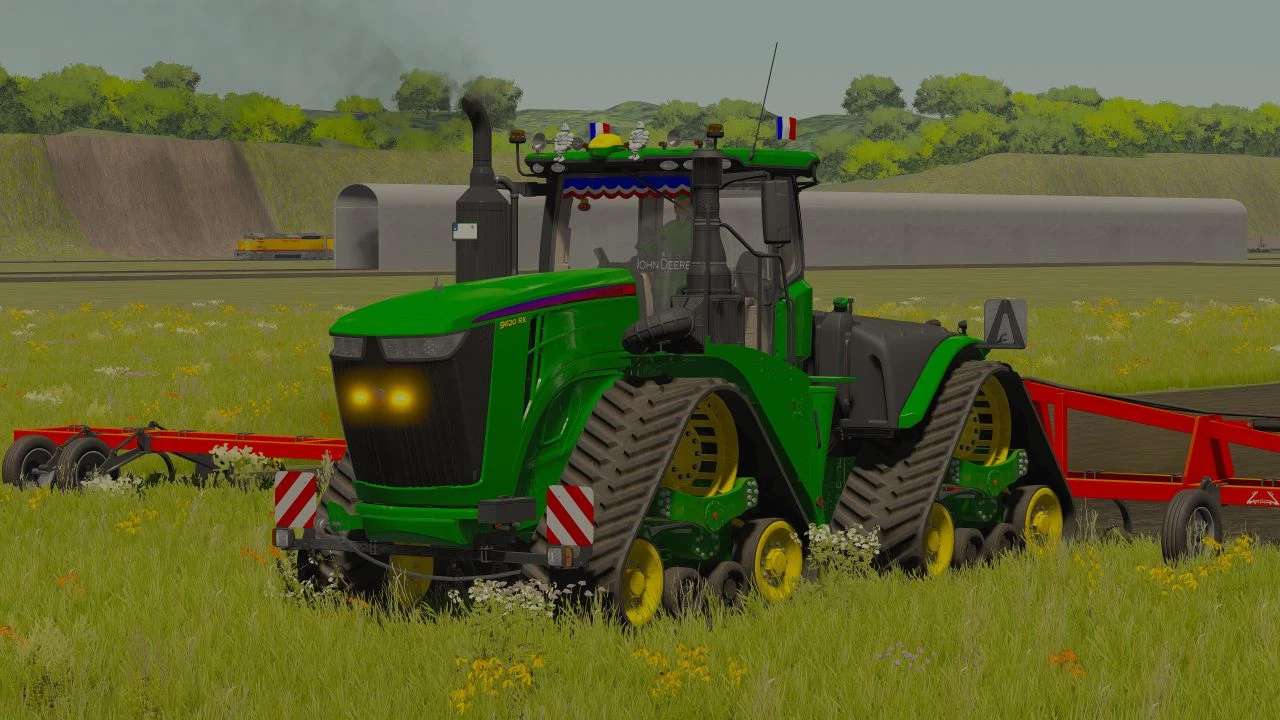
John Deere 9 RX Edited v 1.0


Interior additions/modifications:
– Added a banner to the windshield.
– Addition of an LED plate in the cabin to the windshield.
– Added a pack of beers in the cabin.
– Added a beer bottle to the right side of the seat.
– Added a phone to the seat armrest.
– Added a fire extinguisher in the cabin.
– Added a gun in the cabin on the right side of the seat.
– Added a plant to the right side of the seat.
– Addition of the vehicle registration document to the left side of the seat.
– Added vehicle insurance to the left side of the seat.
– Added 3 blue LEDs in the cabin (1 at the top of the windshield and 2 at the back of the seat.
– Added a poppy below the interior mirror.
– Added a maneuvering ball on the steering wheel.
– Added a luminous John Deere logo on the steering wheel (activation with headlights).
– Added a John Deere logo to the left side of the seat.
Exterior additions/modifications:
– Added 2 rotating lights on the roof.
– Added 2 Michelin men to the roof.
– Added 2 horns on the roof.
– Added 6 position LEDs on the roof.
– Added 2 FR flags to the roof.
– Added 2 JA flags to the roof.
– Added a luminous John Deere logo on the grille (activation with headlights).
– Added a John Deere logo to the hood.
Credits:
romaainyt


