

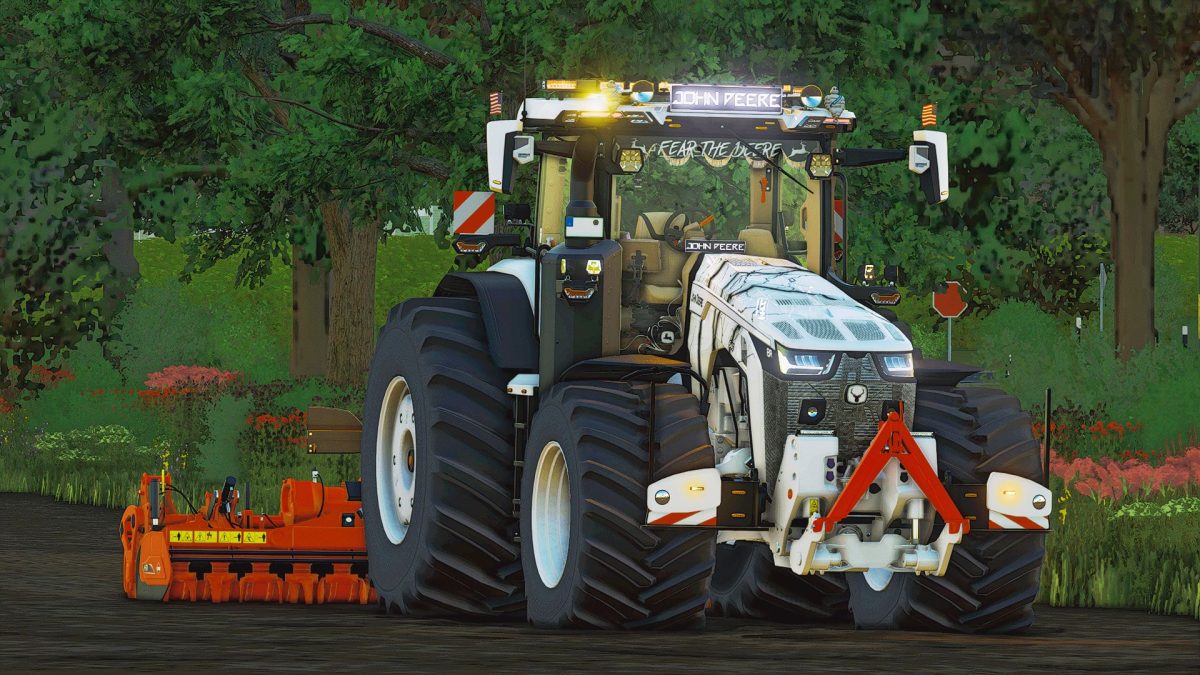
John Deere 8R Extra v 1.0.0.2


General characteristics
Two complete configurations depending on the country: France and Germany
New 640 drinking engine configuration with 690 horsepower, with Vario box and a maximum speed of 63 km/h
External components and 3D elements entirely created by hand, not from giants, with a very high level of detail
Added interior decorations
Molette keys and keys
Hammer
Screwdriver
WD40 bottle
Coca-Cola can
Tablet with support
iPhone with support
CB station with animated cable
Animated deodorant
Pair of Caterpillar shoes
Dog (Charlie)
Talkie-Walkie
Cabinet carpet in Alcantara
Cabin curtains
Starry sky
John Deere LED plaque
John Deere rear sun
Apple helmet
Outdoor decorations added
Configurable bumper
Stickers “JD urine sur deutz”
Stickers “Fear the Deere”
JD sticker before
Trumpet
Bibendum Michelin
2 Gyrophare LED bars
2 LED spots
4 Ozzorg LED spots
John Deere bright led plate with gyrophare
Animated antenna
Red and oranges at engine ignition
Many LEDs (cabin, step, bumper, mirrors)
LED indicators integrated into the headlights and bumpers
LED beats (cabin and bumper)
25 flags from different countries
9 skins for the hood
2 LEDs of work on lifting before
New logo before John Deere
Several colors for stickers
Several colors for the front grid and the hood
New tractor sounds
Special Klaxon for 8R
New 640 engine range (stickers included)
Expanding most tire brands
Configurations available
640 engine
Large XTRA / XXTRA tires (different brands)
Bumper: green, red, black, white
25 Country flags
Skins hood: Agritechnica, Lightning, Patriot (FR), Lightning (Black, White, Gray, Blue, Red), Patriot (GE)
Color of decals: yellow, black, white, green, patriot (FR), patriot (GE)
Front grid: black, gray, white, green, yellow, red, patriot
Hood gate: ditto
Mudguard: with / without
Cabin curtains: without / red, green-yellow, blue, black
Starry sky: with / without
Gyrophare bar: without / Patriote LED (FR), LED Orange
Cabin accessories: Ozzorg, green LED plate, white LED plate, etc.
3 points / weight before
Customizable tractor color
Customizable rims color
Isaria Pro Compact: with / without
Version 1.0.0.2:
* Addition of a new vehicle sounds
* Bug correction
Credits:
DeterMax, romaainyt


