

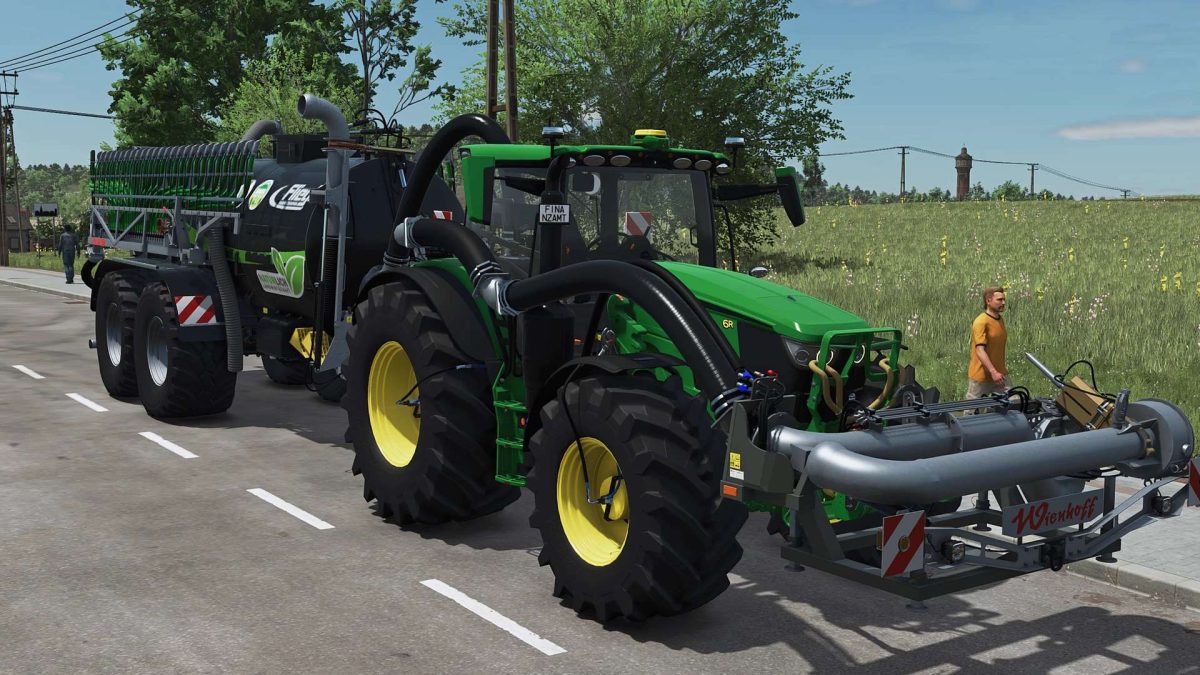
John Deere 6R Medium+ with Agribumper Options v 2.0.4.2


Adapted Tubing – Slurry Hose Connection for Wienhoff FreeSight Front Suction Arm
6R 230 255hp Configurable
6R 250 300hp Configurable
Passenger Script
Turbo Sound
New Tires
New Rims
New Hubs
New Wheel Weights
PTG Tire Pressure Control System with Interior Display (LOOKS ONLY/NO FUNCTION)
Lowerable Front Axle with Mouse Control and Sound
Mouse Control: Left Door and Rear Window with Sound
Agribumper Weight Configurable from 400-1800kg
Agribumper: Speed Camera Configurable
Agribumper: Driving Lights Configurable
Agribumper: Side Lights Configurable
Agribumper: Original Prices
Rotating Beacon Configurable Between Rotating Beacon and Speed Camera
Daytime Running Light Color Configurable
CCI200 Terminal: Lemken/Zunhammer/Kuhn/Krone/Amazone/Pöttinger/Horsch/Wienhoff
Decorative lighting configurable
CB radio with lighting configurable
Animated antenna for CB radio
Main color configurable 6R+Agribumper
Rim color configurable
Mobile phone configurable with splash screen and dark mode when lights are on
Illuminated hood logo configurable
Side lights in warning signs
Interior color configurable
Seat color configurable
Decorative stitching color on seat configurable
Carpet configurable
Hood decal configurable
Warning signs configurable
Front loader console added for FL-683R with hydraulic quick coupler
John Deere 683R front loader added with hydraulic quick coupler
683R front loader color configurable
Front loader configuration: John Deere 663R (standard) / John Deere 683R / John Deere 663R Without hood protector
Front PTO color-configurable
Orange LED parking lights on the roof configurable
Rear fenders configurable (narrow/medium/wide) Decorative rope on the hood protector (front loader selection)
K80 cover caps blue
Decorative rope on the hood protector (front loader selection)
Hood sticker color-configurable, only works when the “Black/White” option is selected
Version 2.0.4.2:
* FIX: New hydraulic hose assignment when using the Wienhoff FreeSight, as optical errors occurred when using the HORSCH front tank
Credits:
Finanzamt31er


