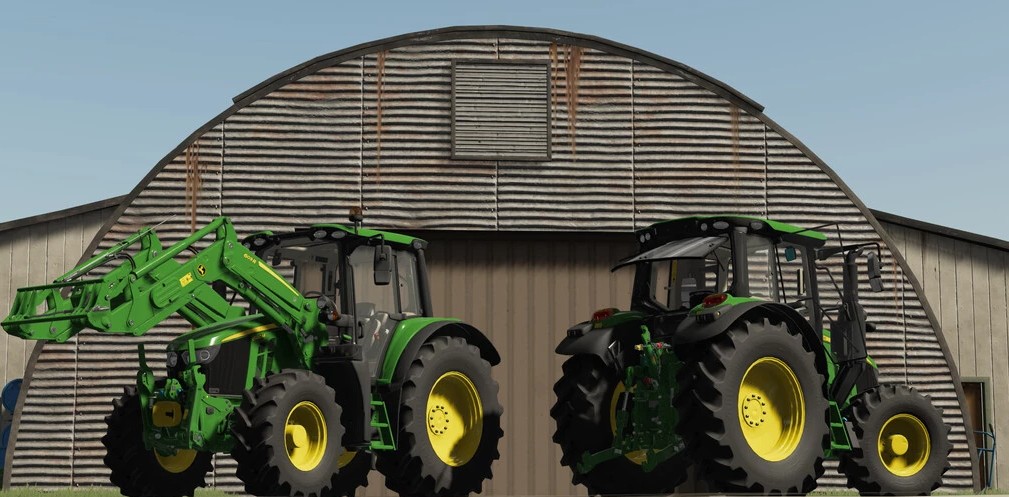
John Deere 6M Series v 1.0


Engine configuration:
– John Deere 6110M 96 kW / 130 HP
– John Deere 6110M 103 kW / 140 HP
Configurations:
– Wheels: Trelleborg, Michelin, Continental, Mitas, BKT, Vredestein, Nokian
– Wheels configuration: Chains, Weights, Wheels Back, Twin wheels all inverted front tire, Wide tires, Narrow Twin Wheels, Narrow wheels
– Front fenders
– Beacon lights
– Decals
– Flag configuration
– GPS (Required Guidance Steering)
– Frontloader attacher
– Animation configurations: Simple IC or Interactive control (just works in the cabin)
– Main color: John Deere Green, John Deere Black Beauty, John Deere Communal
– Rim color: John Deere Green, John Deere Black Beauty, John Deere Communal
– Forest cage configuration
Simple IC:
– Sterring Base
– Door Left
– Door Right
– Window Left
– Window Right
– Window Back
– Window Top
– Passenger Seat
– Bonnet
– Cabin light
Interactive Control:
– Steering Base
– Door Left
– Door Right
– Window Left
– Window Right
– Window Back
– Window Top
– Passenger Seat
– Bonnet
– Beacons
– Hydraulic
– PTO
– GPS
– Cruise Control
– Start Engine
– Lights
– Radio
– Cabin light
Prepared for:
– Simple IC
– Interactive Control
– Guidance Steering
– Precision Farming
– Universal Passenger
Credits:
WOLFex Modding, Luka_HR