

Forester v 1.0.0.2


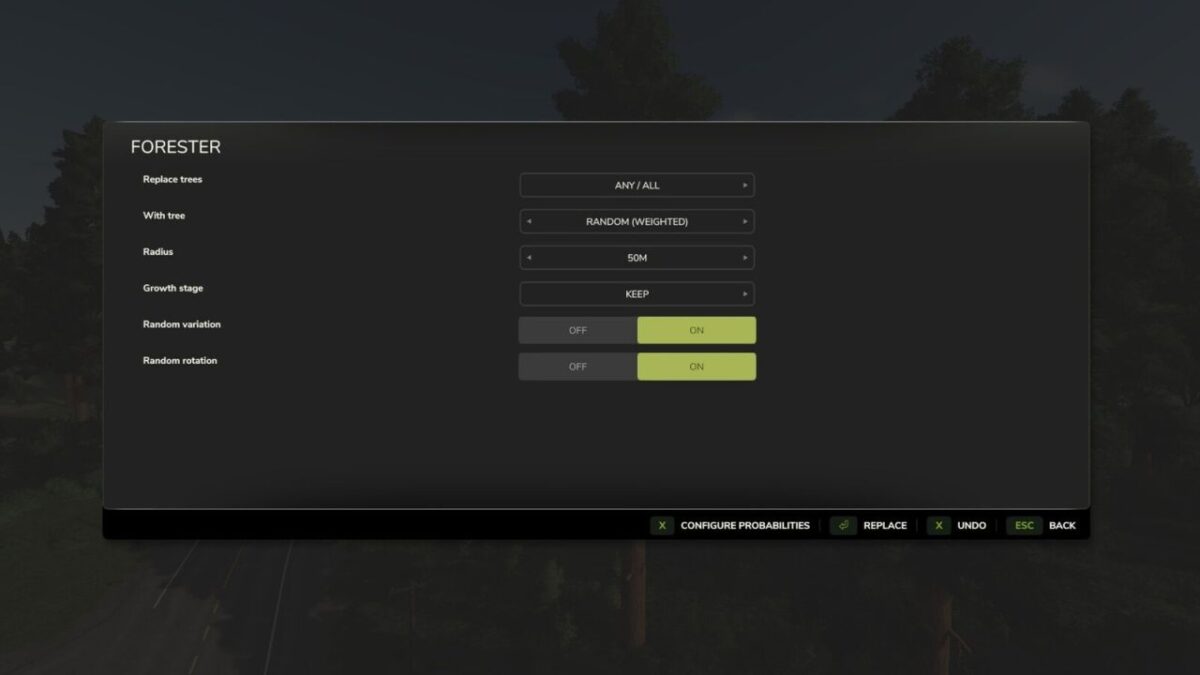
This mod is a tool that replaces or removes trees within a configurable radius.
It allows targeting specific tree types or modifying all trees in an area without manual replanting.
Please save your game before using this tool!
Usage
Press Ctrl + T to open the menu.
Features
– Select a specific source tree type (or Any).
– Select a target tree type, or choose Random, Random (Weighted), or Delete.
– Configurable Random (Weighted) option for custom replacement probabilities.
Options
– Set tree growth stage.
– Randomize growth stages.
– Keep the current growth stage.
– Undo feature that reverts trees to their previous state.
Limitations
– Undo only reverts the most recent action and may not restore the correct growth stage.
– Trees very close to objects are ignored.
– Trees on rocks, cliffs, or decorative objects are ignored.
– Randomized growth stages are biased toward later growth stages.
– Game must be restarted to reset tree LOD.
Version 1.0.0.2:
* Menu remembers settings in the current session
* Tree Replacer rejects trees with only a single growth stage (prevents transport logs and most modded transport logs; unfortunately most modded trees will also be rejected)
* Mod rebuilds/remaps weights so they survive map/mod changes (where indices often shift)
* Added override setting for Tree Replacer when the targeted tree is near or inside an object
Credits:
RHF


