

Extended Mission Info v 1.0


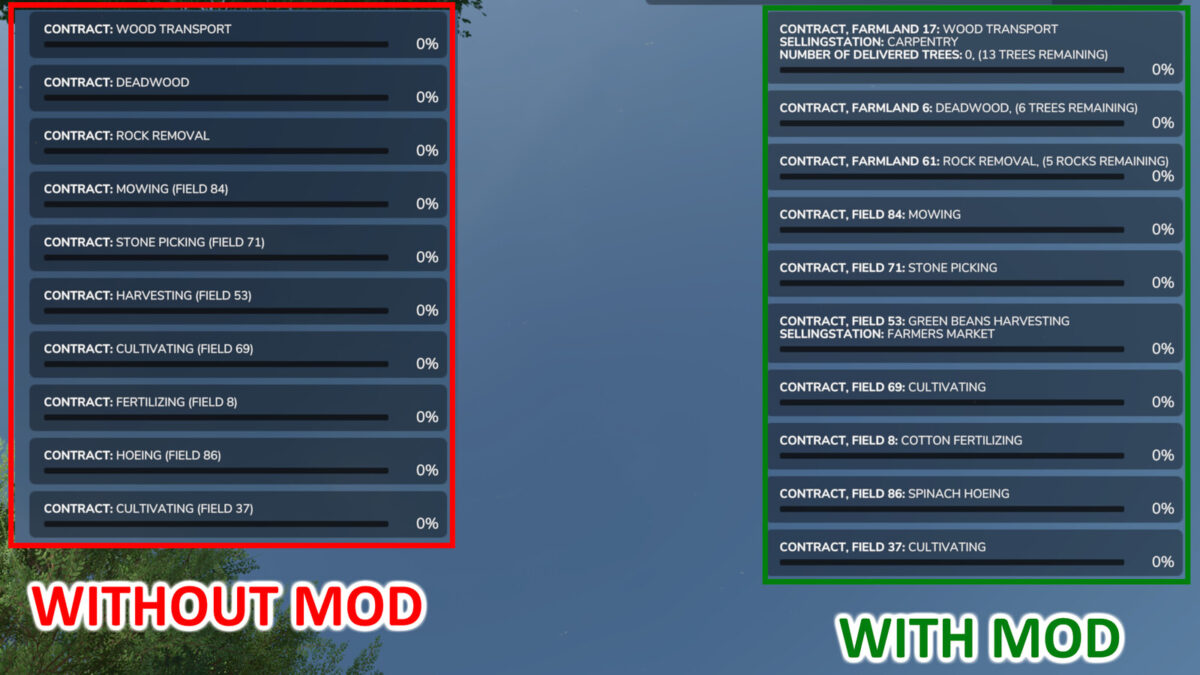
This mod expands and adapts the following in the mission’s info:
In harvest and wood transport missions, the selling station name is now also displayed in a new line.
In wood transport missions, the number of trees and how many are left to deliver is now also displayed.
In deadwood missions, it is now also displayed how many trees you still have to cut down.
In rock removal missions, it is now also displayed how many rocks you still have to remove.
In bale wrapping and baling missions, the requested bale type is now also displayed.
In bale wrapping missions, the number of remaining bales to wrap, is now also displayed.
The fruit type from the field is now also displayed in the following missions:
– Harvesting
– Sowing
– Fertilizing
– Remove weeds
– Weeding
Furthermore, with this mod you can take on 10 missions per farm at once.
Maximum number of contracts offered has been increased to 60. There are also now 8 missions per type possible.
Credits:
Ifko[nator]


