

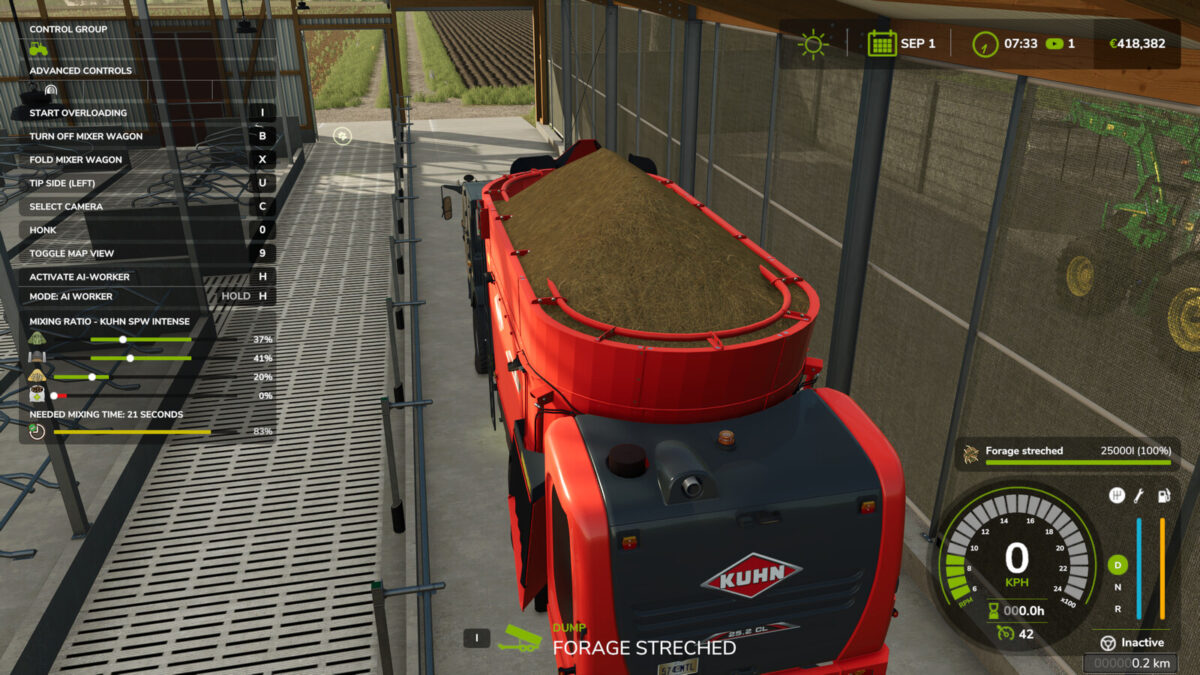
Enhanced Mixer Wagons v 1.0


This script adds an mixing time for all mixer wagons.
With this script, each mixer wagon now needs 2 minutes and 10 seconds to mix the total mixed ration, as soon as the mixing ratio is correct. The mixing time is depending from the ingame time scale.
Of course, it must be turned on to do this. If the mixer wagon is filled during the mixing process, the mixing time will be reset to 70% if it is already over 95%. The mixer wagon must now be turned on so that it can be discharged into the feeding trough.
As long as the mixing ratio is wrong or the mixing time has not run to the end, you have forage, (with straw, forage streched) in the mixer wagon. You can also feed this, but it less effective than the total mixed ration.
The mixer wagon must now be turned on now so that the bales will be dissolved.
The unfinished total mixed ration is accepted as grass in the stable feeding trough.
For modders:
You can deactivate the script for your mixer wagon if this is necessary for any reason. All you have to do is enter the following line in your vehicle.xml:
< enhancedMixerWagon mixingTime="0"/>
You have to remove the space after ” < ". This sets the required mixing time for this mixer wagon to 0. Of course, you can also adjust there the time, that is needed for mixing. The time must be in seconds.
Credits:
Ifko[nator]


