
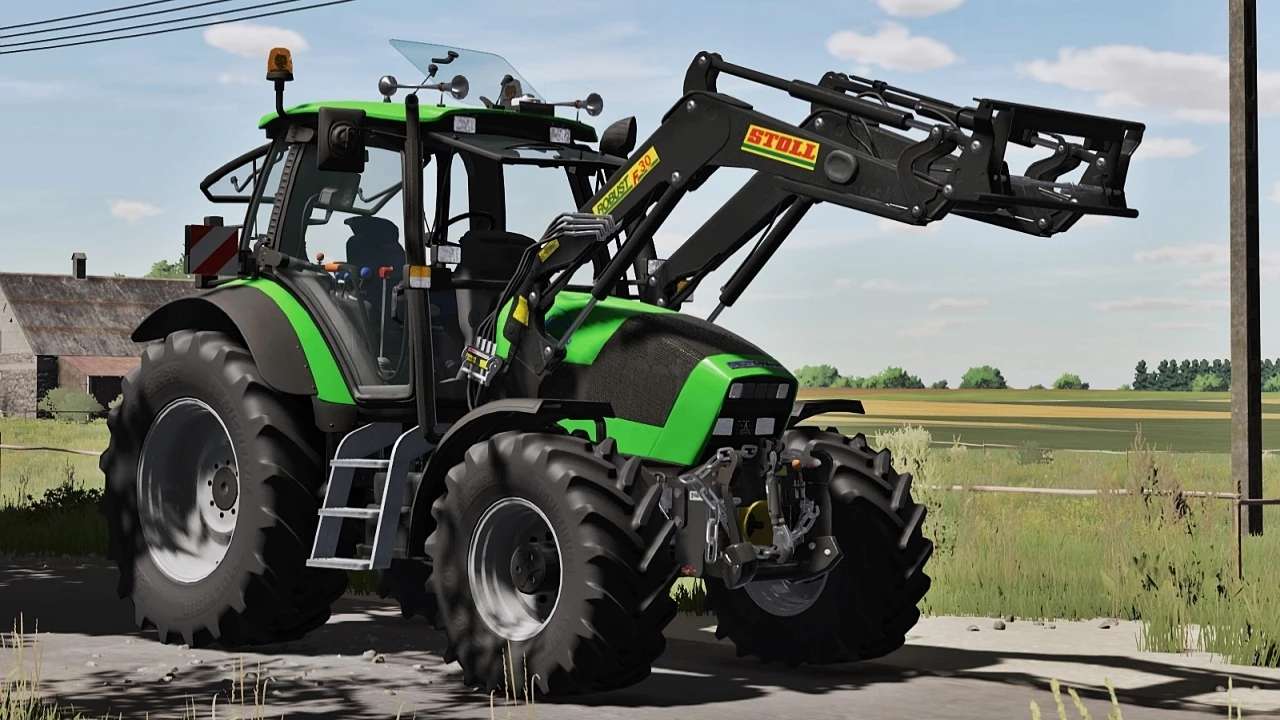
FS25 Deutz Tractors

Deutz Fahr Agrotron Series v 1.0

Deutz Fahr Agrotron Series v 1.0

– Power: 128 – 150 hp
– Wheels and tires config
– Engine power config (Agrotron 128, Agrotron 150.6)
– Opened left door, roof, front and rear window with mouse control
– Frontloader consoles config (Quicke, Hauer and Stoll)
– Rims color config
– Front hydraulic and weights config
– Warning sings config
– Air Trumpets config with new horn sound
– Beacon lights config
– Chain config (On front hydraulic)
– Rear fenders config
– GPS config
– Number plates config
– Compatible with AI Worker
– Compatible with Ground Deformation System
– Animated indoor huds
– Animated parts in cabin
– Lights, work lights, turn signals and beacon lights
– New windows textures
– New dynamic smoke
– New details in model

Credits:

RedCat3D, Digital One
How to install FS25 Deutz Tractors?
Firstly find a mod which you like and want to download. Then download a mod to your PC. Mods are usually in .zip format file. But sometimes it can be in .rar. If a mod file is a .zip format no needed additional actions. If a file is in .rar, then you must unarchive mod with software like WinRar or Zip7. Windows 10 users no need to use software for archives, Win10 itself has a feature to unarchive files.
The next step is to find mods folder in your PC. Usually, it is in Documents/My Games/Farming Simulator 25/2025. Open the "mods" folder and put downloaded .zip archive or unarchived .rar file to this folder.
Last step. Enjoy of FS25 mods!

Leave a Reply

Your email address will not be published. Required fields are marked *