
FS25 Misc

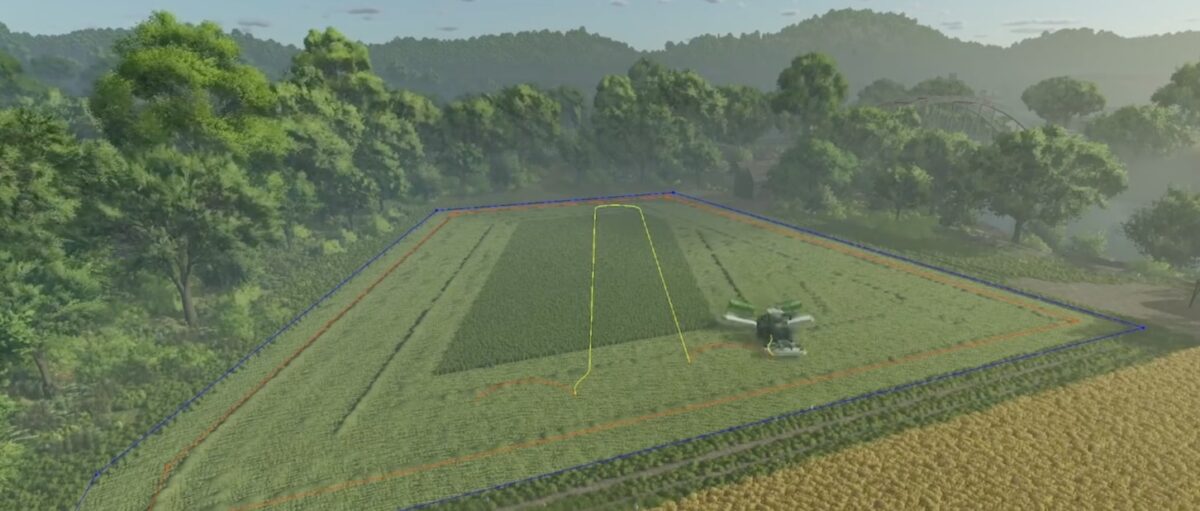
Courseplay v 8.0
Courseplay v 8.0

Courseplay v 8.0

Version 8.0:
* Initial FS25 migration
* While almost all functions from FS22 are implemented back in (except draw field on the map), they can still have errors and not function correctly in some situations
* Added a keybind to generate a course when standing with the vehicle on the field (default ctrl+g), the settings are used from the generator menu
* The help menu is mostly up to date, but some details might not be correct (e.g. custom field, due to missing feature)
* Course editor is disabled and will be readded later
* Better controller support will come with later versions

Credits:

Courseplay Team

How to install FS25 Misc?
Firstly find a mod which you like and want to download. Then download a mod to your PC. Mods are usually in .zip format file. But sometimes it can be in .rar. If a mod file is a .zip format no needed additional actions. If a file is in .rar, then you must unarchive mod with software like WinRar or Zip7. Windows 10 users no need to use software for archives, Win10 itself has a feature to unarchive files.
The next step is to find mods folder in your PC. Usually, it is in Documents/My Games/Farming Simulator 25/2025. Open the "mods" folder and put downloaded .zip archive or unarchived .rar file to this folder.
Last step. Enjoy of FS25 mods!

Leave a Reply

Your email address will not be published. Required fields are marked *