
FS25 Buildings

Concrete Fences v 1.0

Concrete Fences v 1.0

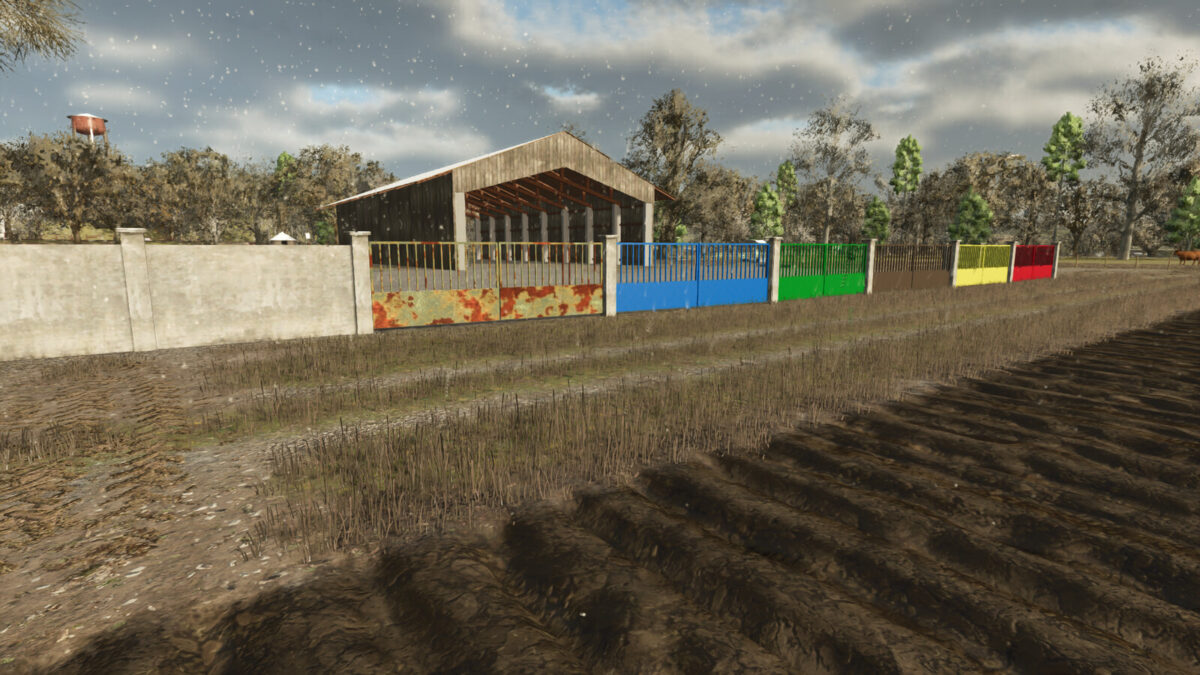
Concrete Fences v 1.0 introduces a selection of sturdy fences designed for your farming landscape. Each section of the fence is priced at $100, while the accompanying gate can be purchased for $1200.

This mod features four distinct wall versions, allowing for a variety of aesthetic choices to suit your preferences. Additionally, you can choose from six different door color options, including Rust, Blue, Green, Brown, Yellow, and Red, enabling you to customize the appearance of your farm. The concrete construction provides a durable option for enclosing areas on your property, enhancing both security and style.

Credits:

Maca
How to install FS25 Buildings?
Firstly find a mod which you like and want to download. Then download a mod to your PC. Mods are usually in .zip format file. But sometimes it can be in .rar. If a mod file is a .zip format no needed additional actions. If a file is in .rar, then you must unarchive mod with software like WinRar or Zip7. Windows 10 users no need to use software for archives, Win10 itself has a feature to unarchive files.
The next step is to find mods folder in your PC. Usually, it is in Documents/My Games/Farming Simulator 25/2025. Open the "mods" folder and put downloaded .zip archive or unarchived .rar file to this folder.
Last step. Enjoy of FS25 mods!

Leave a Reply

Your email address will not be published. Required fields are marked *