
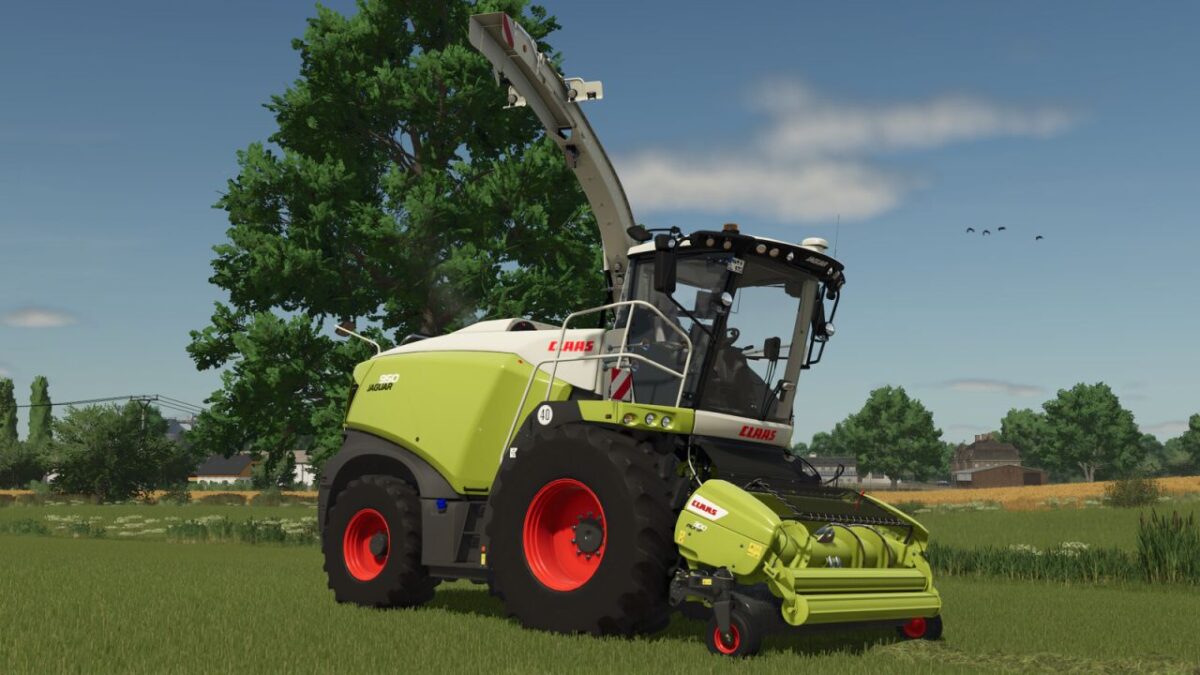
FS25 Claas Harvesters

Claas Jaguar v 1.0.1.0

Claas Jaguar v 1.0.1.0

Price: 510.000 $
Power: 462-925 HP
Max. speed: 40 kph
Shop Category: Forage Harvesters

Engine Configurations:
JAGUAR 930 (462 HP)
JAGUAR 940 (516 HP)
JAGUAR 950 (585 HP)
JAGUAR 960 (626 HP)
JAGUAR 970 (775 HP)
JAGUAR 980 (884 HP)
JAGUAR 990 (925 HP)

Rim color configurations
Design configurations: Standard, Unstoppable, 50 Years
Silage additive tank
Discharge pipe: S, M, L, XL
Animated door

Wheel Configurations:
Trelleborg, Michelin, Continental, Mitas, BKT, Vredestein
Prepared for the Interactive Control Script (FS25_interactiveControl)

Version 1.0.1.0:
* Made various adjustments and improvements
* Added Autofill Camera (Mercedes-Benz DLC required)
* Added Cam Pilot as a configuration option

Credits:

Ls_Agrar_Ole

How to install FS25 Claas Harvesters?
Firstly find a mod which you like and want to download. Then download a mod to your PC. Mods are usually in .zip format file. But sometimes it can be in .rar. If a mod file is a .zip format no needed additional actions. If a file is in .rar, then you must unarchive mod with software like WinRar or Zip7. Windows 10 users no need to use software for archives, Win10 itself has a feature to unarchive files.
The next step is to find mods folder in your PC. Usually, it is in Documents/My Games/Farming Simulator 25/2025. Open the "mods" folder and put downloaded .zip archive or unarchived .rar file to this folder.
Last step. Enjoy of FS25 mods!

Leave a Reply

Your email address will not be published. Required fields are marked *