

Buy Used Equipment v 1.0


Great news! The local dealership have announced that they will provide a broker of used machinery, finding great deals on used equipment on your behalf. The broker will scout the nearby areas for good deals based on your request and hopefully find that dream equipment you have had your eyes on.
Most equipment can be bought as used. In most cases it will have some dents and bruises, and for sure have a fair amount of hours under the hood (if there is any hood that is), but the broker will ensure you get a lot of equipment for your money.
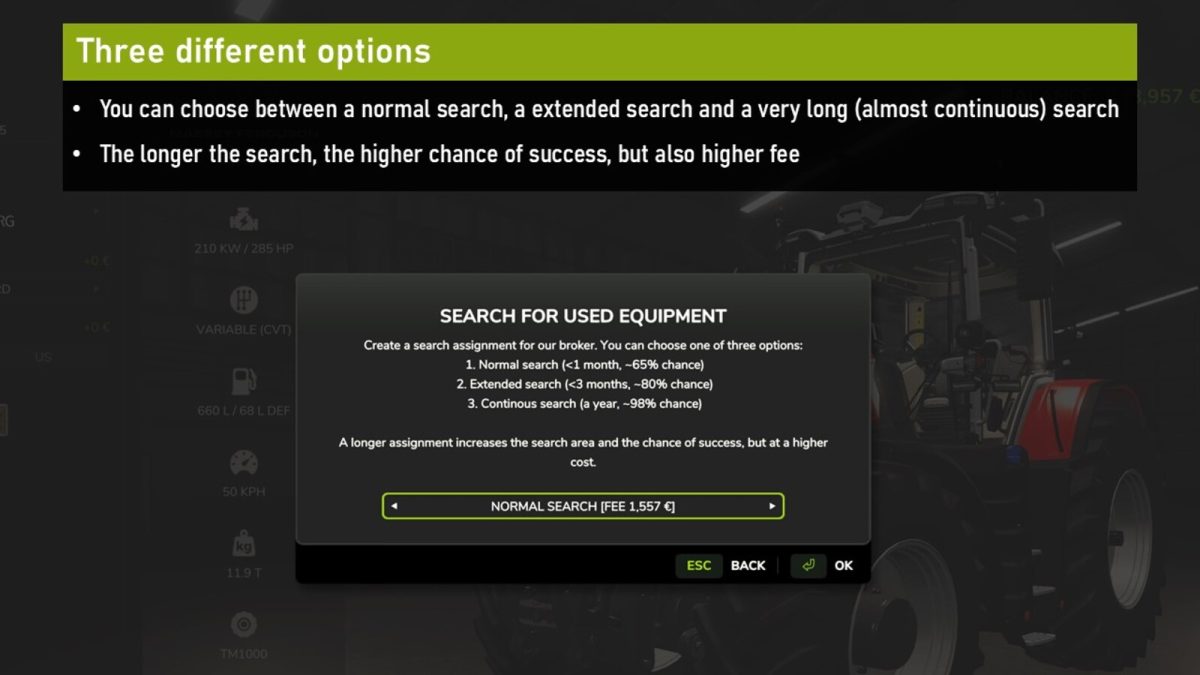
In the store you will now find a new button, “Find Used” (default key: C), where you will have three options:
1. Regular search – Quicker (< month) with ~65% chance of success for a modest fee
2. Extended search - A more thorough search in wider area, up to three months, with a whopping 80% chance of success, although for a higher fee
3. Continous search - For a premium fee, the broker will search relentlessly for a full year, putting out ads globally, with a ~99% chance of success
When paying a higher fee the broker searches for an extended period of time, as well as in a broader geographical area, increasing the chance of success. The choice is yours.
If/when the broker finds a match, you will receive a notification in the game, and the equipment will be available for purchase in the Sales tab in the equipment shop.
As always when buying used equipment, before putting it to good use it is advised to give it a thorough greaseup and overall look at the mechanics to make sure everything is in good working order, the equipment has been used after all.
Note: it is possible to buy multiple search assignments at the same time, this will boost your chances of success (for those items you realy want, and when you cannot wait for the one year search).
Credits:
w33zl


