
FS25 Cars

Audi RS6 Avant v 1.0

Audi RS6 Avant v 1.0

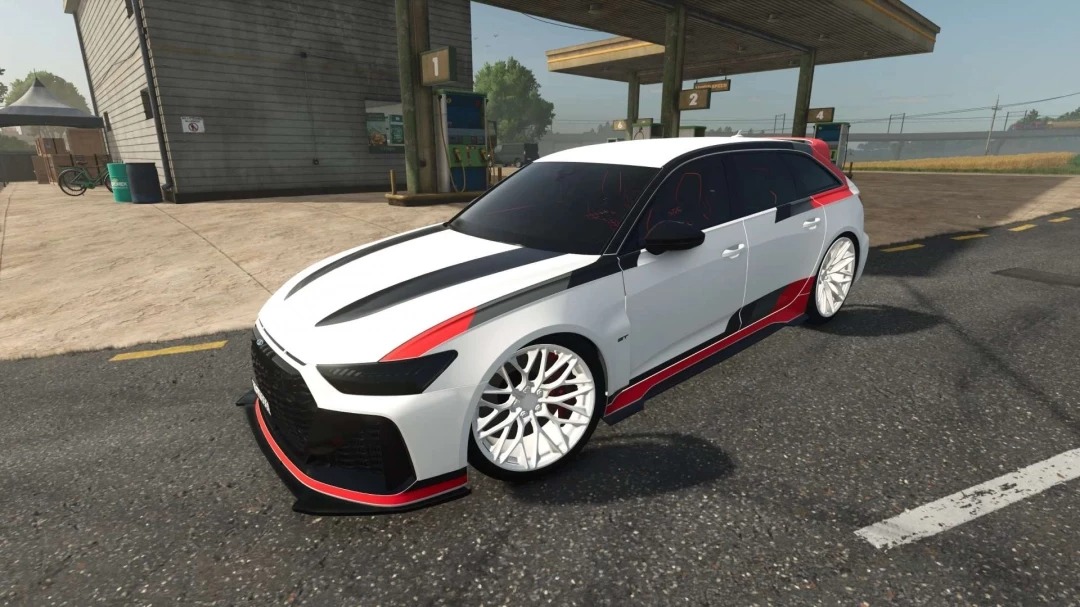
The Audi RS6 Avant seamlessly blends sporty performance with everyday practicality.
Its aggressive design, wide stance, and bold racing inspired livery give it a distinctive and eye catching look.
The lowered suspension, large wheels, and sporty body kit turn this wagon into a true road predator.
Meanwhile, the spacious interior and large cargo area make it ideal for both high speed driving and daily use.
The Audi RS6 Avant is the perfect choice for those seeking a powerful sports car with the practicality of a wagon.

Credits:

sun

How to install FS25 Cars?
Firstly find a mod which you like and want to download. Then download a mod to your PC. Mods are usually in .zip format file. But sometimes it can be in .rar. If a mod file is a .zip format no needed additional actions. If a file is in .rar, then you must unarchive mod with software like WinRar or Zip7. Windows 10 users no need to use software for archives, Win10 itself has a feature to unarchive files.
The next step is to find mods folder in your PC. Usually, it is in Documents/My Games/Farming Simulator 25/2025. Open the "mods" folder and put downloaded .zip archive or unarchived .rar file to this folder.
Last step. Enjoy of FS25 mods!

Leave a Reply

Your email address will not be published. Required fields are marked *