


FS25 Maps

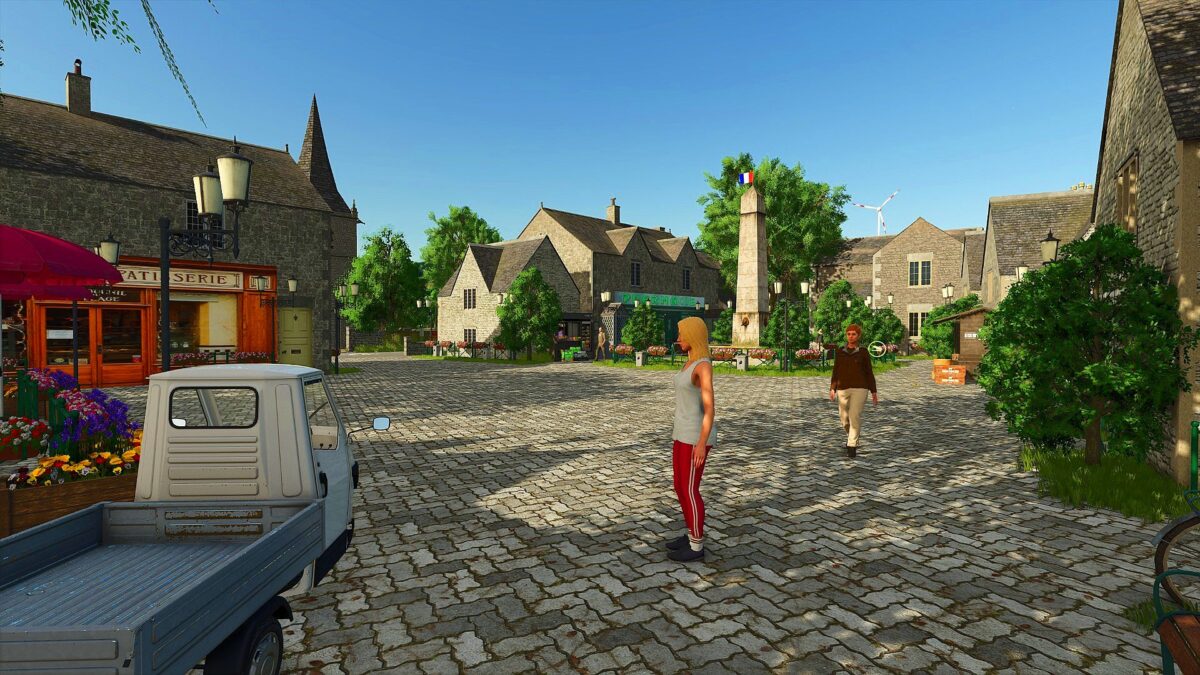
Au Fil des Saisons Map v 1.1

Au Fil des Saisons Map v 1.1

– 66 fields including 6 pastures of 0.10 ha to 2 ha
– 1 functional farmhouse belonging to you with animals
– 3 other abandoned farms just waiting for you
– Various Production and Sales sites
– 1 dealership
– 1 service station
– 1 lime station
– Standard crops
– Nj and Traffic installed on the map

Version 1.1:
* ModDesc up to date
* Background map belonging to you with the possibility now of joining the fields together and cutting the trees as you wish throughout the map
* Fixed Bugs when you click on the “visit” tab of production points (spawn inside buildings)
* Fixed Bugs missing collisions on some buildings
* Removed Addable Triggers Mod (Conflict)
* Various corrections and retouches

Credits:

Gizmo Modding

How to install FS25 Maps?
Firstly find a mod which you like and want to download. Then download a mod to your PC. Mods are usually in .zip format file. But sometimes it can be in .rar. If a mod file is a .zip format no needed additional actions. If a file is in .rar, then you must unarchive mod with software like WinRar or Zip7. Windows 10 users no need to use software for archives, Win10 itself has a feature to unarchive files.
The next step is to find mods folder in your PC. Usually, it is in Documents/My Games/Farming Simulator 25/2025. Open the "mods" folder and put downloaded .zip archive or unarchived .rar file to this folder.
Last step. Enjoy of FS25 mods!

Leave a Reply

Your email address will not be published. Required fields are marked *