


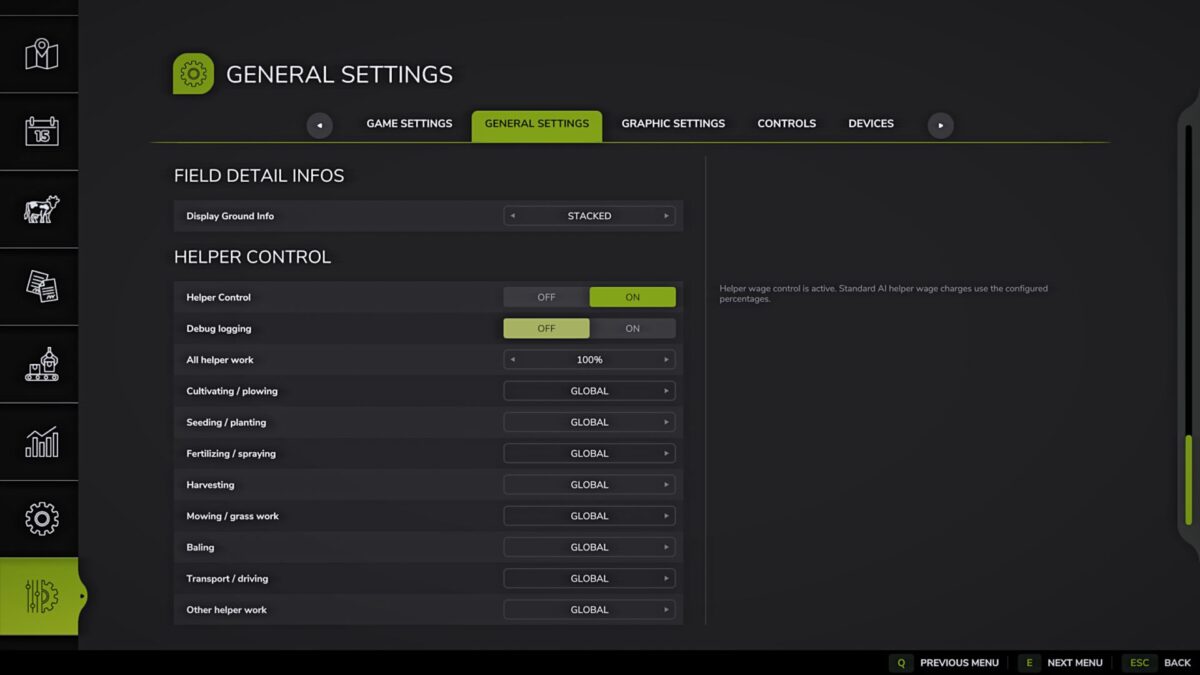
Assistant Control v 1.0


Helper Control allows you to configure payment for standard AI game helpers directly in the “General Settings” tab.
The mod retains the standard game system for paying assistants, but allows you to change the percentage of money written off for the assistant’s work.
Features:
– Turn on and off control of payment of assistants.
– General percentage of payment for all types of work.
– Individual payment percentages for certain types of work.
– Possibility to return a particular type of work to a common value.
– Settings are saved separately for each save slot.
– Payment range: from 0% to 300% in 10% increments.
– A value of 100% means standard game behavior.
Types of work:
– Cultivation / plowing.
– Sowing/planting.
– Fertilizer/spraying.
– Harvesting.
– Mowing / working with grass.
– Bale pressing.
– Transport/driving.
– Other work.
How it works:
When the game charges an AI assistant, the mod detects the current job type and applies the specified percentage of payment.
If a separate value is not specified for the job type, the overall pay percentage is used.
If a separate value is specified for the job type, that value is used.
Examples:
– 100% – standard payment for the game.
– 50% – the assistant receives half the standard pay.
– 0% — assistant payment is disabled.
– 200% – the assistant receives double payment.
Compatible with Courseplay and other assistant payment mods:
Helper Control changes the base pay of the game’s standard AI helpers.
If the helper is launched as standard via the H key, only Helper Control affects its payment. Setting up payment for Courseplay workers does not affect regular assistants.
Courseplay has its own payment setup for workers launched through Courseplay. If Helper Control and Courseplay are used together, Courseplay employees can be paid using both multipliers:
base game payment × Helper Control × Courseplay
Examples:
Helper Control: 100%
Standard helper via H: gets 100%
Courseplay: 500%
Courseplay employee: receives 500%
Helper Control: 50%
Standard Helper via H: Receives 50%
Courseplay: 500%
Courseplay employee: receives 250%
Helper Control: 0%
Standard Helper via H: Receives 0%
Courseplay: 500%
Courseplay employee: receives 0%
For a predictable result, it is recommended to leave the payment of Courseplay workers and other mods that change the payment of assistants at 100% if the cost of assistants is configured through Helper Control.
Credits:
B1zaro


