
FS25 Cars

Sema Golf Cart v 1.0

Sema Golf Cart v 1.0

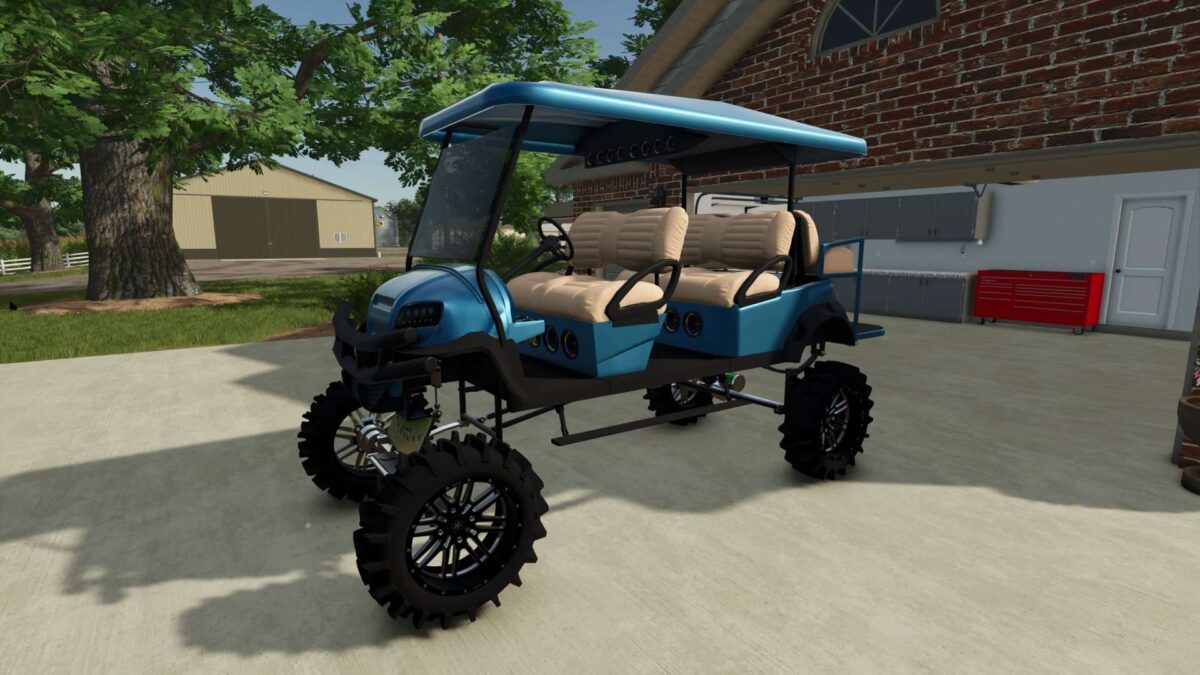
The Sema Golf Cart is a unique custom golf cart that combines compact size, style, and impressive off road capability.
Thanks to its lifted suspension and large off-road tires, this cart performs well not only on golf courses but also around farms, ranches, and dirt roads.
The spacious seating allows multiple passengers to ride comfortably, while the roof provides protection from sun and weather.
With its eye catching design, LED lighting, and off road style, this golf cart is both a practical vehicle and a standout addition to any property.
Sema Golf Cart is a great choice for anyone looking for a comfortable, stylish, and capable small utility vehicle.

Credits:

sun
How to install FS25 Cars?
Firstly find a mod which you like and want to download. Then download a mod to your PC. Mods are usually in .zip format file. But sometimes it can be in .rar. If a mod file is a .zip format no needed additional actions. If a file is in .rar, then you must unarchive mod with software like WinRar or Zip7. Windows 10 users no need to use software for archives, Win10 itself has a feature to unarchive files.
The next step is to find mods folder in your PC. Usually, it is in Documents/My Games/Farming Simulator 25/2025. Open the "mods" folder and put downloaded .zip archive or unarchived .rar file to this folder.
Last step. Enjoy of FS25 mods!

Leave a Reply

Your email address will not be published. Required fields are marked *