

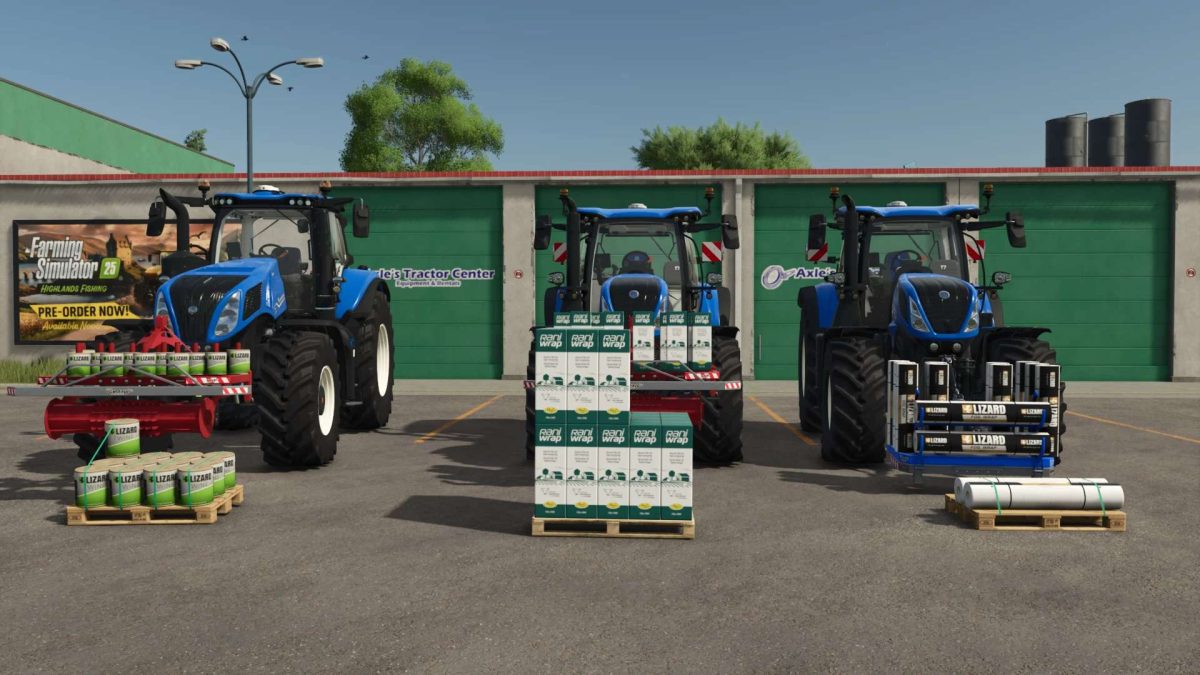
Grizzly Consumable Holders Pack v 1.0


The Grizzly Holder Pack began as a small project during the early stages of FS25, originally created as ornamental weights to add realism to the game. Following initial feedback and with the introduction of extended coding functionality in FS25, the pack has been completely redeveloped from the ground up.
This updated release provides fully functional, customizable holders with improved visual fidelity, dirt and wear masks, and wetness profiles.
Development time for this version: ~30 hours (including texturing, coding, and XML configuration).
Pack Contents
Grizzly Net Holder
Capacity: 11 wraps
Full FS25 material support
Custom dirt and wear masks
Complete wetness profile with custom strobes
Galvanized bottom can be painted (optional all-metal painted finish)
Grizzly Rani Wrap Holder
Capacity: 12 rani wrap boxes
Full FS25 material support
Custom dirt and wear masks
Complete wetness profile with custom strobes
Galvanized extension can be painted (optional all-metal painted finish)
Roller colour customizable
Grizzly Twine Holder
Capacity: 12 twine spools
Full FS25 material support
Custom dirt and wear masks
Complete wetness profile with custom strobes
Galvanized extension can be painted (optional all-metal painted finish)
Roller colour customizable
Usage
The holders can be attached alongside a baler.
To refill, place the holder on the ground and position the baler next to the trigger.
Note: This behaviour is defined by Giants coding and cannot be modified.
Known Issues
Store physics: Rani wrap and twine may tip over in the shop menu.
Attempts to correct this introduced additional in-game issues; functionality outside of purchase is unaffected.
Credits:
Scootz model by J modding


