

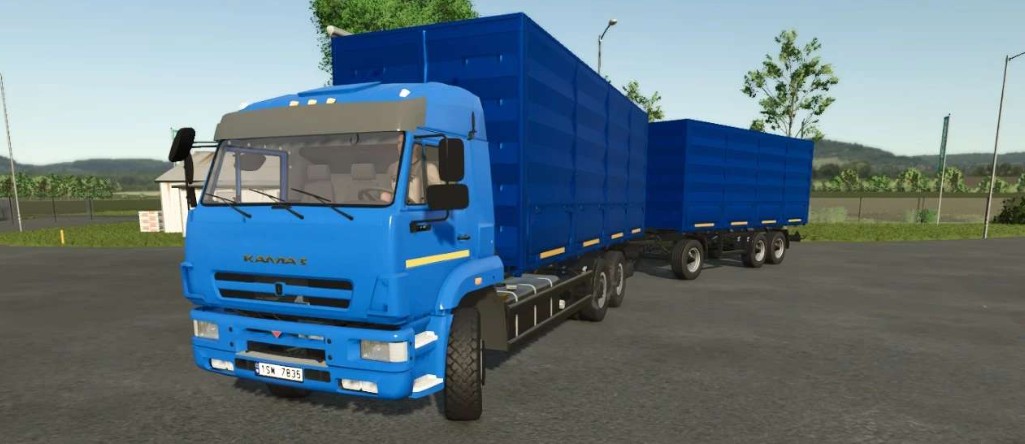
Kamaz 6520 Mammoth v 1.0


The Kamaz 6520 Mammoth v 1.0 is a versatile vehicle designed to enhance your farming experience in Farming Simulator 25. This mod offers players a powerful truck with a strong engine capable of producing 400 hp, making it suitable for a variety of farming tasks. With a top speed of 90 km/h, it allows for efficient transportation around your farm and between fields.
One of the standout features is its impressive body volume capacity, available in 20,000 l., 30,000 l., 40,000 l., and 50,000 l. options, making it adaptable to your specific needs for hauling crops or materials. The mod also provides customization options, including different cabin types, additional body kit configurations, and a selection of mirror choices to ensure the truck meets your requirements.
Furthermore, users can personalize the appearance of the vehicle by selecting various colors for the cabin, body, and wheels. Additionally, the mod comes with a trailer that matches the grain truck body characteristics, expanding your transportation options on the farm.
– Price: from 71800 euros
– Power: 400 hp
– Speed: 90 km/h
– Body Volume Options: 20,000, 30,000, 40,000, 50,000 liters
Credits:
VolgaFS


