
FS22 Buildings

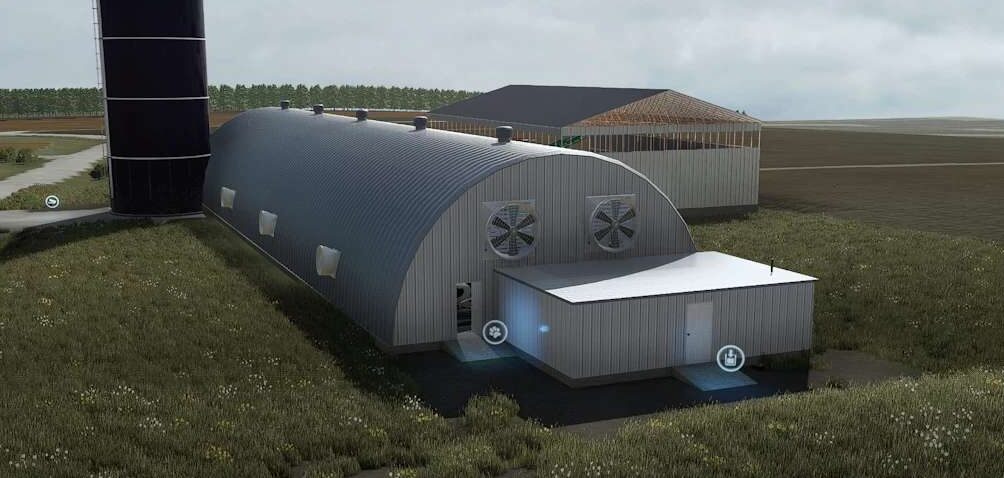
Dome Tie Stall v 1.0

Dome Tie Stall v 1.0

The Dome Tie Stall v 1.0 is designed to enhance your farming experience with its spacious dimensions of 165 x 42 meters. This structure provides ample room for your livestock, contributing to an efficient farming setup. The mod is free of errors, as confirmed by the TestRunner, ensuring a smooth integration into your game. Additionally, the stall includes functioning fans and lights, which can improve the comfort of your animals and the overall ambiance of your farm. This mod is a practical addition for players looking to expand their livestock facilities.

– Size 165 × 42 meters
– TestRunner and log clean
– Working fans and lights

Credits:

BSLModding

How to install FS22 Buildings?
Firstly find a mod which you like and want to download. Then download a mod to your PC. Mods are usually in .zip format file. But sometimes it can be in .rar. If a mod file is a .zip format no needed additional actions. If a file is in .rar, then you must unarchive mod with software like WinRar or Zip7. Windows 10 users no need to use software for archives, Win10 itself has a feature to unarchive files.
The next step is to find mods folder in your PC. Usually, it is in Documents/My Games/Farming Simulator 25/2025. Open the "mods" folder and put downloaded .zip archive or unarchived .rar file to this folder.
Last step. Enjoy of FS25 mods!

Leave a Reply

Your email address will not be published. Required fields are marked *